VMware Fusion, Unparalleled Windows Virtualization

by Scott Beale on August 15, 2007 · 17 comments

VMware Fusion

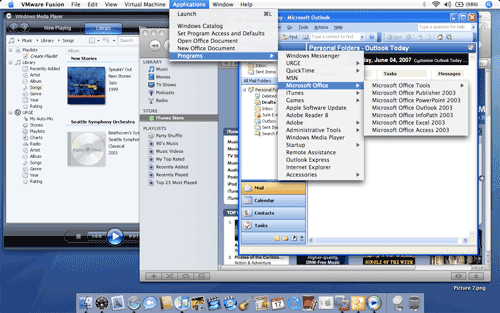
I just installed VMware Fusion 1.0, a new desktop virtualization program that allows you to seamlessly run multiple operation systems on your Intel-based Mac. I setup a virtual machine for Windows Vista on my Mac Pro. The whole process was super easy and took only a few minutes, in fact for me it was much faster than installing Windows on a PC. So far everything works really well and I like it as much, if not more than Parallels Desktop for Mac (another great virtualization program).

Oh and then there’s VMWare’s amazing Unity feature which allows you to run Windows apps alongside your Mac apps. From what I have seen so far, it is even better than the Parallels’ Coherence mode. Here’s a video showing Unity in action.

Paul Stamatiou has a great write-up on VMware Fusion based on his notes from a conference call with VMware when they released Fusion on August 6th

On a sidenote, VMWare just had their IPO yesterday with a 76% gain in just one day, making it the biggest tech stock IPO since Google. It will be interesting to see where things go from here. The good news is that you now have two great choices that will allow your Apple computer to run multiple versions of Windows and Linux, which can save quite a bit of time (switching between computers) and money (additional hardware costs).

UPDATE 1: Randy Stewart just tipped us off to CNET’s performance tests of various virtualization programs on Crave. According to their tests, VMware blows away Parallels. Are there any other tests that you guys know of?

Oh and in my orginal write-up I forgot to mention CrossOver Mac by CodeWeavers, which is another Mac virtualization program. I played around with it a little, but ultimately used Parallels, that is until VMware Fusion was released.

UPDATE 2: Chris Pirillo has posted a video of his comparison between Parallels vs VMware Fusion. Chris says that “idea of ’switching’ is finally worth seriously considering for those of us dyed-in-the-wool Windows users”.

Here Are A Few Related Posts You Might Enjoy:

Hot Couture: A Fusion of Fire & Fashion at The Crucible

Update on Windows Vista Laptop Blogger Controversy

Why Does Windows Still Suck?

Windows On A Mac With Boot Camp

Burger King’s 1 3/4 lb Windows 7 Whopper

filed under Apple

{ 3 trackbacks }

one digital life » Blog Archive » VMware Fusion for $36
October 10, 2007 at 8:56 am
PC World: Fastest Vista Laptop, An Apple MacBook Pro | Laughing Squid
October 29, 2007 at 8:19 pm
For Best Vista Performance Buy An Apple MacBook Pro « Thomas - Technical Blogger
October 30, 2007 at 1:39 pm

{ 7 comments… read them below or add one }

1 Randy Stewart August 16, 2007 at 10:55 am

Scott-

Two questions –
1. do you know if VMWare can import a Parallels install (I’m not looking forward to reinstalling Windows just to try it out).
2. 3d support – does VMWare support Aero and/or DirectX9 apps (like games or Virtual Earth)?

Maybe kinda esoteric questions, but lemme know if you know.

Cheers,
Randy

Reply

2 Scott Beale August 16, 2007 at 11:18 am

Randy,

1. Yes, you can convert a Parallels virtual machine into a VMware virtual machine: http://www.vmware.com/community/ann.jspa?annID=391

You can also use an existing boot camp partition of Windows. I did this on my MacBook Pro last night and it was setup in minutes.

This program is super easy to setup and use. Very impressive for a 1.0 release. I can’t wait to see what they do next with it.

2. Regarding your second question, you may want to do a search in VMware’s KB and support forums: http://www.vmware.com/support/

Maybe someone from VMware will jump in here and answer any questions people might have.

Reply

3 Chris August 16, 2007 at 11:51 am

I’m pushing to get site wide licenses for Fusion. IT looks amazing, and parallels sucks… eats up so much memory.

Reply

4 Pete Prodoehl August 16, 2007 at 1:00 pm

I ended up getting Parallels a while back, mainly because it would import my old Virtual PC images, which saved me a *ton* of time from installing various old versions of Windows and getting different versions of IE installed. Does VMware Fusion import Virtual PC images?

Reply

5 Randy Stewart August 16, 2007 at 1:45 pm

Holy god…. If CNET’s tests are accurate, Parallels might be heading for the Trash…

http://crave.cnet.com/8301-1_105-9760910-1.html?tag=nefd.lede

Except for the fact that Parallels could run Quake, it got royally trounce in CNET’s speed tests.

Eek. I’ve been a loyal Parallels user since its first release.

Cheers,
Randy

Reply

6 Mark Jaquith August 16, 2007 at 10:34 pm

I, of course, bought Parallels three weeks ago. And six weeks ago? I bought iWork ‘06. I should go buy a bunch of copies of OS X Tiger in late September, just to round out my nearly-obsolete software buying spree. Le sigh.

Reply

7 Ed T. August 28, 2007 at 9:09 am

I’ve been a Parallels user since it was in beta and have installed it at several customer’s sites. And while Parallels is a great product and their staff is undoubtedly overworked, the two answers to support issues I’ve submitted were very rude. Combine that with a consistent (apparently unsolvable) issue with dropped connections from Parallels-Win and WIndows servers, and I’m ripe to dive into VMWare.

Anyway, just wanted to post this link as I was searching for a way to recycle my Microsoft tax from Virtual PC into Parallels (and then into Fusion) and found this direct route from Virtual PC WinXP Pro to self-contained bootable disk (usable in Parallels or VMWare Fusion).
http://www.macosxhints.com/article.php?story=20060527175405403

BTW, Mark Jaquith – Le Very Funny! I feel your pain.

Reply

Leave a Comment

You can use these HTML tags and attributes: <a href="" title=""> <abbr title=""> <acronym title=""> <b> <blockquote cite=""> <cite> <code> <del datetime=""> <em> <i> <q cite=""> <strike> <strong>

Moderation: All comments are manually approved, so if your comment is approved it may take a while for your comment to appear on this blog post.

Irrelevant, obnoxious, trolling, abusive and spam comments will not be approved. Let's keep things civil and on topic. Basically what we are saying, if your comment does not add to the conversation, it will not be approved.

Real Name & Website: For the most part do not post anonymous comments. Please list your real name and provide a link to your website, blog, Twitter account, etc. You know who we are, so we ask the same of you.

Corrections: If you want to point out a typo or correction, please email us instead. Typo or correction comments will not be approved since they are pretty much useless once they are corrected and then only tend to confuse things.

Gravatars: If you would like a Gravatar to show up with your comment? Just sign-up for an account and any comment with your email address will display your Gravatar.

Previous post: Chaos Communication Camp 2007 Photos

Next post: Pigs On Parade, Celebrating 100 Years of Pike Place Market