Windows Experience Index for Acer Ferrari 1000

by Scott Beale on December 29, 2006 · 9 comments

Windows Experience Index

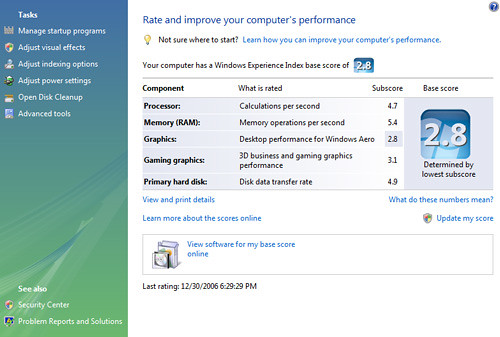
I just wanted to follow-up on something people have been discussing. On my original post about the Acer Ferrari 1000 laptop with Windows Vista that was sent to me, I included a screenshot of the computer information section of the control panel. eWeek’s Microsoft Watch and OakLeaf Systems both blogged that on that screenshot they noticed that the laptop had a low Windows Experience Index score of 2.8. In the comments of that post Zen suggested that I click on the “Update my score” to see if that rating would improve. I went ahead and tried that, but the score remained 2.8. I’ve included a screenshot of the full Windows Experience Index breakdown for those who are interested.

The Windows Experience Index measures the capability of your computer’s hardware and software configuration and expresses this measurement as a number called a base score. A higher base score generally means that your computer will perform better and faster than a computer with a lower base score, especially when performing more advanced and resource-intensive tasks.

Each hardware component receives an individual subscore. Your computer’s base score is determined by the lowest subscore. For example, if the lowest subscore of an individual hardware component is 2.6, then the base score is 2.6. The base score is not an average of the combined subscores.

You can use the base score to confidently buy programs and other software that are matched to your computer’s base score. For example, if your computer has a base score of 3.3, then you can confidently purchase any software designed for this version of Windows that requires a computer with a base score of 3 or lower.


For more information, check out Nick White’s Windows Vista blog post: “Windows Experience Index: An In-Depth Look”

Here Are A Few Related Posts You Might Enjoy:

Microsoft Sent An Acer Ferrari Laptop With Windows Vista

Update on Windows Vista Laptop Blogger Controversy

Windows Vista Laptop on eBay, Proceeds Going To EFF

Windows On A Mac With Boot Camp

Windows Vista Laptop Auction Traffic

filed under Uncategorized

{ 1 trackback }

Laughing Squid » Microsoft Sent A Free Laptop With Windows Vista
January 4, 2007 at 3:08 pm

{ 4 comments… read them below or add one }

1 BugAlugs February 20, 2007 at 2:25 am

My PC is quite nice but a Windows Experience Index of ONLY 4.7 !

Processor – 4.7
RAM – 5.9
Graphics – 5.9
Gaming Graphics – 5.9
Primay Hard disk – 5.7

So why is my CPU so slow?
The new dual core E6600 should be hitting 5.4 according to forums/sites/pundits and the like
I’ve been into BIOS and Vista settings, I’ve made sure that no CPU throttling is occuring.
My only other though is that i’m running the 64bit version.

Does anyone know if the 64bit version puts a different requirement on the CPU/Pocessor test ?

Some example stats

My Rig

E6600 4 MB L2 2.40 GHz 1066 MHz – WEI RATING 4.7
Vista Ultimate – 64 bit

85.94229
48.20735
229.75929
394.35495
9.83065

Friends Rig
Dell XPS Laptop

T7400 4 MB L2 2.16 GHz 667 MHz – WEI RATING 5.4
Vista Home Premium – 32 bit
-
110.64363
56.51694
312.99292
510.65292
6.92793

Any thoughts on this would be great

BugAlugs

Reply

2 iqbal April 21, 2007 at 9:45 pm

i think the graphic card driver and stuff should be updated to get higher score and higher performencer. i believe ATI radeon x1150 in acer ferrari can do much better than 2.8 since my ATI 200m can score 3.1 after i updated the graphic card driver with ATI latest driver release. i really love to see the score for ferrari 1000 after the graphic card be updated.

Reply

3 john September 8, 2007 at 5:03 am

This comment is for BugAlugs
either your bios settings are completely incorrect or you have a really bad motherboard cpu combo

Reply

4 Finnegan Murphy April 13, 2008 at 9:04 am

Both of these ratings sound right for you specs

You have a 2.8 because your laptop has a low end graphics card (ATI Radeon Xpress 200M). You could consider upgrading if you are a gamer, otherwise it is not a big deal. Bugalugs 4.7 is not surprising for his processor, although you could try running the test with all applications closed including sidebar.

Reply

Leave a Comment

You can use these HTML tags and attributes: <a href="" title=""> <abbr title=""> <acronym title=""> <b> <blockquote cite=""> <cite> <code> <del datetime=""> <em> <i> <q cite=""> <strike> <strong>

Moderation: All comments are manually approved, so if your comment is approved it may take a while for your comment to appear on this blog post.

Irrelevant, obnoxious, trolling, abusive and spam comments will not be approved. Let's keep things civil and on topic. Basically what we are saying, if your comment does not add to the conversation, it will not be approved.

Real Name & Website: For the most part do not post anonymous comments. Please list your real name and provide a link to your website, blog, Twitter account, etc. You know who we are, so we ask the same of you.

Corrections: If you want to point out a typo or correction, please email us instead. Typo or correction comments will not be approved since they are pretty much useless once they are corrected and then only tend to confuse things.

Gravatars: If you would like a Gravatar to show up with your comment? Just sign-up for an account and any comment with your email address will display your Gravatar.

Previous post: Windows Vista Laptop Auction Traffic

Next post: ScobleShow With Doug Rowan & Scott Beale