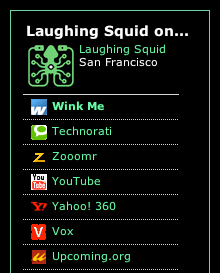
Wink Widget

by Scott Beale on February 21, 2007 · 0 comments

Wink Widget

I’ve been playing around with the new Wink profile widget which is a great way to organize all of your various social networks on your sidebar (you can see it in action in our lower left-hand sidebar). Each link in the widget pulls in your RSS feed for that service and then when a visitor mouses over the link, a window will appear showing the most recent items from your feed. It’s an innovative approach to creating a blogroll like function for social networks and web services, which can be displayed in multiple locations, while being managed centrally through Wink. This is part of Wink’s recent focus on “people search”, a way of helping people, with their various online identities, find communities that interest them.

The Wink Widget is one of the many projects that my friend Beach has been working on at Wink (he’s their director of product management) and you can read more about it on his blog.


Here Are A Few Related Posts You Might Enjoy:

Wink 2

Beach Leaves Yahoo, Goes To Wink

Widget Summit 2007, Exploring Widets & Content Syndication

Winkers Jeans, Make Your Butt Wink When You Walk

Widget Summit 2008, Exploring Widgets & Content Syndication

filed under Uncategorized

Leave a Comment

You can use these HTML tags and attributes: <a href="" title=""> <abbr title=""> <acronym title=""> <b> <blockquote cite=""> <cite> <code> <del datetime=""> <em> <i> <q cite=""> <strike> <strong>

Moderation: All comments are manually approved, so if your comment is approved it may take a while for your comment to appear on this blog post.

Irrelevant, obnoxious, trolling, abusive and spam comments will not be approved. Let's keep things civil and on topic. Basically what we are saying, if your comment does not add to the conversation, it will not be approved.

Real Name & Website: For the most part do not post anonymous comments. Please list your real name and provide a link to your website, blog, Twitter account, etc. You know who we are, so we ask the same of you.

Corrections: If you want to point out a typo or correction, please email us instead. Typo or correction comments will not be approved since they are pretty much useless once they are corrected and then only tend to confuse things.

Gravatars: If you would like a Gravatar to show up with your comment? Just sign-up for an account and any comment with your email address will display your Gravatar.

Previous post: Join The Walkstars on Their Last 5 Miles

Next post: Look Shiny