TwitBin, A Firefox Extension For Twitter

by Scott Beale on May 6, 2007 · 4 comments

TwitBin

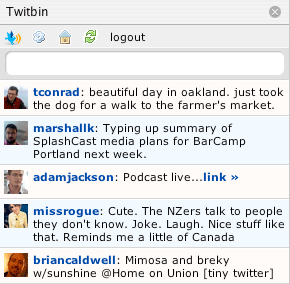
infinimedia, web development company based out of Coral Gables, FL, recently released TwitBin, a really cool Firefox Extension that enables you send and receive Twitter messages right from your browser.

TwitBin

Looking for more great Twitter tools and information? Check out the Twitter Fan Wiki.

via » Chris Messina on ma.gnolia

Here Are A Few Related Posts You Might Enjoy:

Firefox 2

Firefox 3 Released & Download Day 2008

SpellBound Firefox Spellchecker

Firefox, Happy 20,000,000!

Firefox 3 Robot Themed Easter Egg

filed under Twitter

{ 2 comments… read them below or add one }

1 Chris May 6, 2007 at 8:09 pm

trying to jump on the twitter band wagon… but I got some bugs in this Twitbin + NoScript + AdBlock. IT would appear that something is blocking advertisements trying to load up in TwitBin… and I also can’t get to the configuration unless I globally allow scripts. I got some debuggin to do i suppose.

Reply

2 Xavier May 7, 2007 at 10:26 am

Scott,
Thanks for posting about Twitbin, we really appreciate it. I’m glad you think it’s a cool application. We really want to hear as much feedback from the users as possible so that we can make the next version even more targeted to the user. We are planning on having more preferences in the settings menu, so stay tuned for the next version. If you have any questions, or comments, feel free to visit our blog or email me directly.
I see Chris’s comment and will try and look into this issue personally.
Thanks again!
Xavier

Reply

Leave a Comment

You can use these HTML tags and attributes: <a href="" title=""> <abbr title=""> <acronym title=""> <b> <blockquote cite=""> <cite> <code> <del datetime=""> <em> <i> <q cite=""> <strike> <strong>

Moderation: All comments are manually approved, so if your comment is approved it may take a while for your comment to appear on this blog post.

Irrelevant, obnoxious, trolling, abusive and spam comments will not be approved. Let's keep things civil and on topic. Basically what we are saying, if your comment does not add to the conversation, it will not be approved.

Real Name & Website: For the most part do not post anonymous comments. Please list your real name and provide a link to your website, blog, Twitter account, etc. You know who we are, so we ask the same of you.

Corrections: If you want to point out a typo or correction, please email us instead. Typo or correction comments will not be approved since they are pretty much useless once they are corrected and then only tend to confuse things.

Gravatars: If you would like a Gravatar to show up with your comment? Just sign-up for an account and any comment with your email address will display your Gravatar.

Previous post: AACS Vows to Go After People Who Posted HD DVD Key

Next post: Amazing Pilobolus Dance Theater Performance at The Oscars