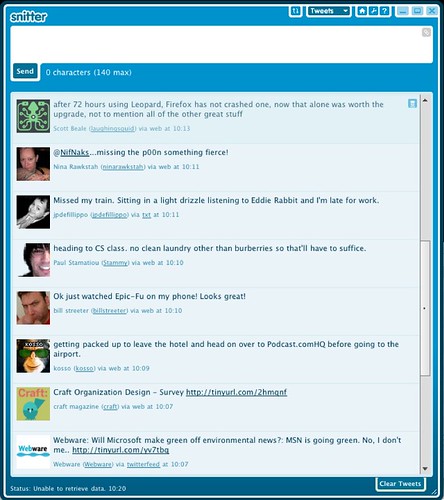
Snitter, A Desktop App for Twitter Powered by Adobe AIR

by Scott Beale on October 30, 2007 · 16 comments

Snitter

I recently started using Snitter, a desktop app for Twitter that works on both a Mac or PC. It is powered by Adobe AIR and was built by Ottawa web developer Jonathan Snook. It’s a really well designed application and has been great way to keep track my ever-increasing Twitter overload. It comes bunch of built-in themes and gives you full access to all of your Twitter information (Tweets, Arcive, Replies, Direct Messages, etc.) which can be toggled by keyboard shortcuts. Jonathan explains why he developed Snitter:

I built Snitter for a couple reasons. First off, I wanted to take AIR out for a spin and see what it could do. Secondly, I find using the Twitter web site frustrating at times because it doesn’t offer up features that I’ve always felt could be easily added. So, I’ve gone ahead and built an app with the features that I’ve always wanted.

Here’s a list of Snitter’s features:

* auto-updates tweet list
* highlights messages sent to you via @ syntax (and makes a chirp)
* clear current list of tweets
* refresh list of tweets
* displays last time it tried to request an update
* view 20 most recent items in your timeline
* view 20 most recent replies
* view 20 most recent direct messages
* view and filter friends list by name and screen name
* view and filter followers
* links to easily @reply and Direct message users
* keyboard shortcuts to access each panel (t=tweets, a=archives, r=replies, d=direct messages, f=favourites, i=friends, o=followers, u=updates)
* add favorites tab and allow tweets to be set as a favorite
* will notify you of new versions of Snitter
* audible notification of new tweets
* will remember previous window size and location
* will minimize to system tray
* auto-login

Previously I had used Twitterrific, which is also a great Twitter app, but it would often have problems updating, so I decided to give Snitter a try. Also Snitter has a minimize option (some reason Twitterrific did not have one) which is super useful when you need to get some work done.


Here Are A Few Related Posts You Might Enjoy:

ReadAir, A Google Reader Desktop Client Built on Adobe Air

Seesmic Desktop Twitter Client Preview Release

WeFollow, A User Powered Twitter Directory

Facebook Releases New Desktop App

Tweetie For Mac, A Fantastic New Desktop Client For Twitter

filed under Technology

{ 8 comments… read them below or add one }

1 stephen October 30, 2007 at 10:50 am

snitter? don’t people have enough to do with just their regular lives,that they need a way to organize their twitter overload? twitter overload? if you find yourself overloaded with imaginary “friends,” how about ditching twitter, and “interface” with real people? scary, i know, but it can be done.

Reply

2 Scott Beale October 30, 2007 at 10:56 am

If anything, Twitter has caused an exponential increase in the number of people that I interact with offline.

Also, who are all of these “imaginary” friends you are referring to? Ok, you caught me, I actually created that screenshot in Photoshop and made up a bunch of fake people that I wish I knew in real life.

Reply

3 schlomo October 30, 2007 at 11:12 am

If you think Scott Beale doesn’t know many people, then you don’t know Scott Beale!!

He is the wind beneath my wings.

Reply

4 Jeff Clavier October 30, 2007 at 11:12 am

Indeed Scott, we are all subjects of your imagination, as is this comment :-).

Reply

5 SFSlim October 30, 2007 at 11:38 am

He may be the wind beneath Schlomo’s wings, but I’ve always thought of Scott as the heavy water from a nuclear reactor, extracted and used to concoct a Marie(curie)tini, garnished with a calamari and served to the reactor’s operator, still on shift.

But then again, I’m just an imaginary person, so my (imaginary) imaginings don’t count for much. Sigh.

Reply

6 Ted Rheingold October 30, 2007 at 5:06 pm

Another Snitter feature I like is the built in tiny url creator.

A feature I’m wanting is key commands to scroll down and up twitters. On Mac only the mouse can control ir

Reply

7 terry chay October 31, 2007 at 10:04 am

Another Adobe.AIR Twitter app is Spaz, reviewed in Ars Technica

http://arstechnica.com/journals/apple.ars/2007/10/11/twitter-with-spaz-air-interview-with-dev-ed-finkler

I can’t compare the two (I roll old skewl with the web and SMS), but I should mention that I have a big bias for Spaz.

http://terrychay.com/blog/article/spaz-adobe-air-funkatron-karenism.shtml

Reply

8 Bill Streeter November 1, 2007 at 8:50 pm

Yes I can verify that I am indeed completely fictional.

Reply

Leave a Comment

You can use these HTML tags and attributes: <a href="" title=""> <abbr title=""> <acronym title=""> <b> <blockquote cite=""> <cite> <code> <del datetime=""> <em> <i> <q cite=""> <strike> <strong>

Moderation: All comments are manually approved, so if your comment is approved it may take a while for your comment to appear on this blog post.

Irrelevant, obnoxious, trolling, abusive and spam comments will not be approved. Let's keep things civil and on topic. Basically what we are saying, if your comment does not add to the conversation, it will not be approved.

Real Name & Website: For the most part do not post anonymous comments. Please list your real name and provide a link to your website, blog, Twitter account, etc. You know who we are, so we ask the same of you.

Corrections: If you want to point out a typo or correction, please email us instead. Typo or correction comments will not be approved since they are pretty much useless once they are corrected and then only tend to confuse things.

Gravatars: If you would like a Gravatar to show up with your comment? Just sign-up for an account and any comment with your email address will display your Gravatar.

Previous post: BarCamp LA and BarCamp San Diego

Next post: Social Network Message Autoresponder