WordPress Launches New Plugin Directory

by Scott Beale on March 20, 2007 · 1 comment

WordPress Plugin Directory

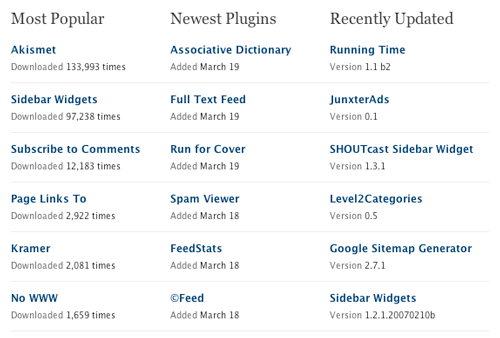
Last week WordPress launched a new Plugin Directory. Plugins are one of the best features of WordPress, allowing you to extend the functionality of your blog in countless ways. Previously these plugins, created by a worldwide community of open source developers, were scattered all over the place without a unifying interface, but now they can all be located in one central location.

Here are the top 5 plugins used on Laughing Squid:

1) Akismet – Absolutely essential. It kills comment spam dead.

2) Flickr Photo Album – Allows you to create a local photo gallery of your Flickr photos using the Flickr API and also it’s a great way to add photos from Flickr to your blog posts. Here’s my previous writeup on Flickr Photo Gallery plugin.

3) flickrRSS – Lets you to add your last batch of Flickr photos to your blog via RSS.

4) Google Sitemaps – A really simple way to create and submit your sitemap to Google.

5) wp-cache – Sets up caching for your blog using static files, which is a great way to improve the speed and performance of your blog, especially under high loads, like when one of your blog posts makes the front page of digg.


Related Posts:

The WordPress Automatic Upgrade Plugin Rocks

Flickr Photo Album WordPress Plugin

WordPress Releases Stats Plugin

YARPP, Yet Another Related Posts Plugin For WordPress

WordPress Launches New Video Sharing Service VideoPress

filed under Flickr, WordPress

{ 1 trackback }

New WordPress Plugins Directory - graysky
March 23, 2007 at 1:12 pm

{ 0 comments… add one now }

Leave a Comment

You can use these HTML tags and attributes: <a href="" title=""> <abbr title=""> <acronym title=""> <b> <blockquote cite=""> <cite> <code> <del datetime=""> <em> <i> <q cite=""> <strike> <strong>

Please read our Comment Guidelines before leaving a comment:

Moderation: Because of comment spam issues, all comments are manually approved, so if your comment is approved it may take a while for your comment to appear on this blog post.

Name & Website Required: Due to rampant abuse, we are no longer posting anonymous comments. Please list your real name and provide a link to your website. If you don't have a website, then use a link to your account on Twitter, Flickr or some other form of web presence. With very few exceptions, comments that do not refernce include an actual name or url will not be approved.

Also when we ask for your name we mean your actual name, not Discount Car Products or some other attempt at spam or lame SEO.

Be Civil: Irrelevant, obnoxious or abusive comments will not be approved. Let's keep things civil and on topic. Basically what we are saying, if your comment does not add to the conversation, it will not be approved.

Spam: Spam comments in any form will not be approved. We also do not approve comments that left for the sole purpose of posting a link.

Corrections: If you want to point out a typo or correction, please email us instead. Typo or correction comments will not be approved since they are pretty much useless once they are corrected and then only tend to confuse things.

Gravatars: If you would like a Gravatar to show up with your comment? Just sign-up for an account and any comment with your email address will display your Gravatar.

Previous post: How To Fake Being Awake With a Haircut

Next post: SuperHappyDevHouse 16