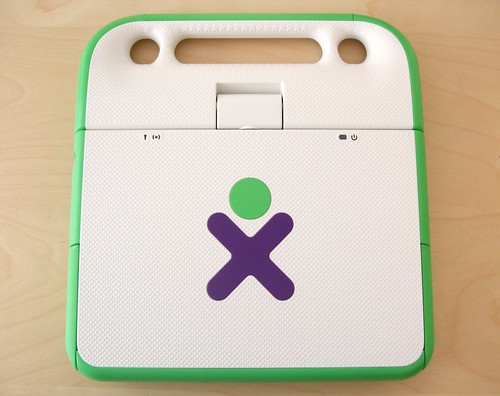
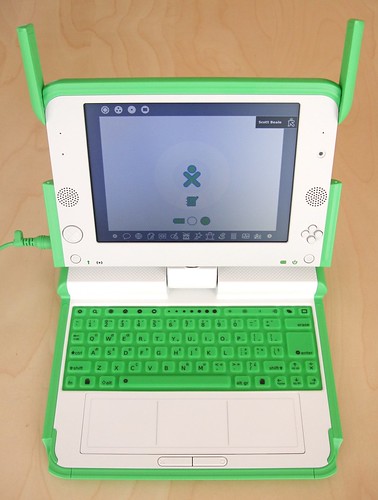
My XO Laptop from One Laptop Per Child has arrived. It’s a really great little computer. I ordered it through last month’s OLCP Give One Get One Program.
The laptop comes with very little physical documentation, but instead sends you to the comprehensive getting started guide online.
I’m working on getting online with the laptop, but it currently does not support WPA/WPA2, which is something they are working on for early 2008. It doesn’t have an Ethernet port either, but I wonder if you can connect via USB.
UPDATE 1: It looks like an Ethernet connection via USB is possible.
UPDATE 2: Adin pointed me to a script in the OLPC wiki that will enable WPA.
Here Are A Few Related Posts You Might Enjoy:
- One Laptop Per Child Launches Give One Get One Program
- Is Your Child A Tagger? Asks The City of Santa Ana, CA
- The Doggie Diner Dog Heads Have Arrived…
- StickerGiant Is Hosting a Laptop Stickers Contest


{ 13 comments… read them below or add one }
You can connect via USB ethernet ports, check out the forums at OLPC News. http://olpcnews.com/forum/index.php
Thanks Fricka, I’ll update the post.
No ethernet port? Ouch. I mean, at $100… -maybe- I could see leaving it out…. At $200… not so much. I’m sure there are people that would have paid $102 or $202 instead to have it. ;)
WPA works just fine on the XO once you enable it. Here’s a link to the script and all the instructions you need (and a good XO community):
http://olpcnews.com/forum/index.php?topic=20.0
::whew:: got through. :) didn’t know if you monitored @ replies on twitter. (and twitterific’s acting up ATM)
I thought the point of these laptops were to supply those in need w/ free to low-cost computers. I can’t believe people are complaining about the lack of ethernet ports, etc… -this isn’t meant to be a toy for rich kids… or the next evolutionary step in technoligical wizardry. I just hope these will go to the people who need them.
Do you get a picture of the kid in Africa, or where ever, that got the free one?
John Hell – I’m not sure where my donated laptop went, but it would be great if there were a way to find out who received it and where.
After installing the latest build of the OLPC OS (http://”http://download.laptop.org/xo-1/os/official/653/”) I can now use WAP2 without the Wpa.sh patch. After the install I was able to connect to my Apple Airport Extreme easily. The procedure to install the latest build is quite simple (http://wiki.laptop.org/go/Activated_Upgrade). All you need to do, is download the files and put them on the root level of a clean flash drive. Then, you put the flash drive in the OLPC and reboot while holding the four game buttons. Let go the buttons when prompted and wait. Be warned that the installation will wipe all user files. Backup anything you don’t want to lose.
Hey-
Got mine too and it is awesome! The only complaint is the keyboard, which should be better because that’s what makes it a laptop and not a stylus or a tablet. Plus, it should teach kids how to type. While it’s great to REACH these kids, it would be nice to HEAR from them too! While there are some rough edges, it’s really amazing.
But, if you’re a hardcore linux geek, it’s a DREAM MACHINE.
Find the shell and go nuts. I plugged in an external keyboard and mouse and it’s great. Also, I plugged in a $12 USB ethernet port, and bam, it just plain works. You can update it with yum, which points to an OLPC repository!! That’s pretty neat. Non OLPC aware apps do work but they appear very tiny because they use the window manager differently. You can kill the window manager and run twm! You can even run xeyes in the shell, and it goes full-screen on another OLPC window, which looks really cute, wish I had a picture for you! (try it!)
I plugged in an external serial port and it worked fine. So far everything I’ve plugged in has been recognized.
Now I am hoping to contribute to this great project and develop some stuff for this thing, which is really great.
It’s a step in the right direction. Laptop marketing is driven by the software, so you can’t get a nice low-power, open, inexpensive machine. This is just the machine! It’s all I need. (Except for the keyboard. Dammit.) Plus it’s silent and it doesn’t get hot. You flip it around, turn the picture upside down with a button, hang it up, plug in your keyboard and mouse and even ethernet, and you have one imac per child, using about 1/30th the juice!!!
It’s a scaled down Fedora, and most stuff is where you’d expect it and most of the stuff you d want is there and it works!!
-Psyched!
=Rich
We got ours yesterday too. Cute lil sucker! Am gonna try that upside-down thing Rich suggested. But right now it’s charging up in the hall bathroom. :-)
$200 is niice:) but what happened to “$100″? main-options “id” like are: “WIFI”(is that what “wpa” means?), & “Replace-Free Battery”(or @ least verry-long life).
It’s a tough sell for. The Asus EEE 701 is going for about $280 and is a far more practical machine.
I think it’s a fair comparison. If you really cared about the charity aspect of OLPC then why not give BOTH machines and make two children happy?