LaCie iamaKey, A USB Flash Drive in The Shape of a Key

by Scott Beale on March 27, 2009 · 3 comments

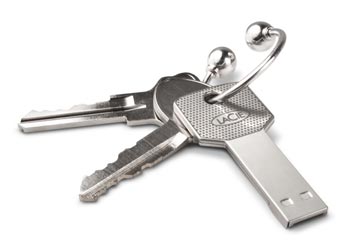
LaCie iamaKey

The LaCie iamaKey is quite possibly the coolest USB flash drive I’ve ever seen.

With the new LaCie iamaKey, inventive storage meets data protection. The key-shaped design is functional and memorable, and the protection that the LaCie iamaKey offers makes it extremely reliable. Best of all, with its 4GB and 8GB models, you can fit an enormous amount of data in a small flash drive. With the universal Hi-Speed USB 2.0 interface, iamaKey can be used with both PC and Macs. Hi-Speed USB 2.0 not only offers universal compatibility and cross-platform convenience, but features a hot-pluggable connection and high-speed transfer rates, and is Windows ReadyBoost™ compatible. With its eye-catching design, the iamaKey certainly stands out, but its connector (Gold SIP) is both water- and scratch-resistant, making it one of the most durable and thinnest USB keys on the market. Protective edges on the connectors ensure that you’ll always insert the LaCie iamaKey properly, keeping it usable and safe.

LaCie also makes the larger itsaKey, as well as the PassKey, a microSD USB Card Reader and the CurrenKey, a USB Flash Drive in the shape of a coin.

via FreshArrival

image via LaCie

Here Are A Few Related Posts You Might Enjoy:

Gun Egg Fryers, Cook Your Eggs in the Shape of Gun

Bag Embossed With Gun Shape by Vlieger & Vandam

The Squidolin, A Self-Teaching Violin in the Shape of a Squid

500 XL, Desktop Speakers in the Shape of Giant iPod Earbuds

Food That Takes the Shape of Its Container

filed under Gear

{ 3 comments… read them below or add one }

1 adam jackson March 27, 2009 at 10:44 am

I’ve already ordered one of these. A USB stands out like a sore thumb (thumb drive lol)

it’s obvious and bulky. this is a genius idea

Reply

2 Thomas Schewe March 27, 2009 at 11:34 am

Looks nice.

BUT: “…iamaKey can be used with both PC and Macs.” Only with these two systems? Ignorants!

(I know, that it would work with Linux, FreeBSD, OpenSolaris and so on. But I hate phrases like this.)

Reply

3 Alex Bronca March 29, 2009 at 1:28 pm

While a bit bulkier, the CurrenKey looks quite nice as well. I’m going to have to order one of these.

Reply

Leave a Comment

You can use these HTML tags and attributes: <a href="" title=""> <abbr title=""> <acronym title=""> <b> <blockquote cite=""> <cite> <code> <del datetime=""> <em> <i> <q cite=""> <strike> <strong>

Moderation: All comments are manually approved, so if your comment is approved it may take a while for your comment to appear on this blog post.

Irrelevant, obnoxious, trolling, abusive and spam comments will not be approved. Let's keep things civil and on topic. Basically what we are saying, if your comment does not add to the conversation, it will not be approved.

Real Name & Website: For the most part do not post anonymous comments. Please list your real name and provide a link to your website, blog, Twitter account, etc. You know who we are, so we ask the same of you.

Corrections: If you want to point out a typo or correction, please email us instead. Typo or correction comments will not be approved since they are pretty much useless once they are corrected and then only tend to confuse things.

Gravatars: If you would like a Gravatar to show up with your comment? Just sign-up for an account and any comment with your email address will display your Gravatar.

Previous post: Periodic Table of Console & Handheld Game Controllers

Next post: “San Francisco” by Jill Sobule, Directed by Margaret Cho