Eye-Fi Releases Digital Camera Wireless SD Memory Card

by Scott Beale on October 30, 2007 · 17 comments

Eye-Fi

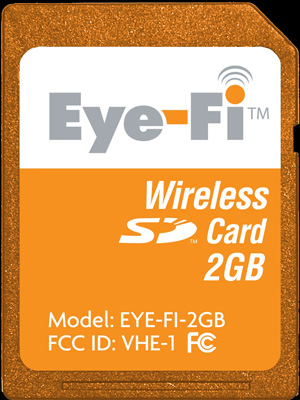
Eye-Fi has just announced the release of their new wireless SD memory card for digital cameras. The card, which they have been beta testing over the last year and a half, connects your local wi-fi network and automatically uploads photos stored on the card to your computer or to one of 17 online photo sharing services and social networks. The 2GB SD card is now available and is priced at $99.99.

Eye-Fi uses home wireless networks to eliminate the time-consuming chore of dealing with cables, card readers or software plug-ins associated with uploading photos. Users simply turn on their digital camera and their pictures are wirelessly uploaded. The Eye-Fi Card works with existing and new SD-compatible digital cameras and stores photos like a conventional SD memory card.

Last year I met with Eye-Fi CEO Yuval Koren who showed me an early prototype of their wireless SD card and I participated in their early beta program.

UPDATE: Here’s more coverage from Technology Review & Gizmodo.

Here Are A Few Related Posts You Might Enjoy:

Eye-Fi, Wireless SD Memeory Card For Digital Cameras

Flickr Camera Finder

Lawrence Lessig on Wireless in SF

Core Memory: A Visual Survey of Vintage Computers

Kensington’s New Ultra-Thin Wireless Mouse Series

filed under Technology

{ 3 trackbacks }

Eye-Fi, Wireless SD Memeory Card For Digital Cameras | Laughing Squid
October 30, 2007 at 8:59 am
ThoSch:Blog » Blog Archiv » Eye-Fi - WLAN für die Digicam
October 30, 2007 at 1:21 pm
Eye-Fi Releases Digital Camera Wireless SD Memory Card | Everton1878s Blog
October 31, 2007 at 2:17 am

{ 7 comments… read them below or add one }

1 Amit Gupta October 30, 2007 at 8:51 am

That thing is like magic! I’ve been using it for the past year and can’t believe someone didn’t make this sooner. Totally changed how I use my camera.

Amit

p.s. Amazon shows 3-5 weeks, but we’re shipping it from the Photojojo store within a week! http://photojojo.com/store/awesomeness/eye-fi-wifi-memory/

Reply

2 Eric Skiff October 30, 2007 at 9:11 am

Holy crap that’s the coolest thing I’ve ever heard. Right now I’m using my iPhone and the 3rd party app pushr to accomplish something similar, but being able to use my real camera would be HUGE! I’m definitely putting this on my christmas wishlist.

Reply

3 Michael Lambie October 30, 2007 at 9:25 am

Scott, how was your experience with the beta? This really looks amazing. what a great invention. I think a bluetooth companion would also be cool. I’m just wondering how the wifi capabilities translate outside.

Reply

4 Tris Hussey October 30, 2007 at 9:26 am

Wow! That’s awesome! Okay I have to look for that!

Love to see how it works … I’d almost like to load to my machine first, then something like Flickr.

Reply

5 Scott Beale October 30, 2007 at 9:34 am

Michael, it worked great for me. At the time I was shooting much more on CF, so I didn’t really get to use it as much. Also, when I was testing it, they hadn’t rolled out partnerships with all of the photo sharing sites yet, so that will make it even better.

Reply

6 Jason DeFillippo October 30, 2007 at 5:29 pm

I was a beta tester on this and it worked amazingly well. A bit of battery drain but all in all it uploaded to Flickr flawlessly. I can’t wait to get my production unit!

Reply

7 Patrick Wang November 1, 2007 at 12:05 pm

Jason,
Can you comment on the battery drain? I’d love to use this as well but with the expensive CRV3 batteries I use on my K100D, I’d rather not get this Wi-Fi card if it’s going to be a big drain.
Thanks!

Reply

Leave a Comment

You can use these HTML tags and attributes: <a href="" title=""> <abbr title=""> <acronym title=""> <b> <blockquote cite=""> <cite> <code> <del datetime=""> <em> <i> <q cite=""> <strike> <strong>

Moderation: All comments are manually approved, so if your comment is approved it may take a while for your comment to appear on this blog post.

Irrelevant, obnoxious, trolling, abusive and spam comments will not be approved. Let's keep things civil and on topic. Basically what we are saying, if your comment does not add to the conversation, it will not be approved.

Real Name & Website: For the most part do not post anonymous comments. Please list your real name and provide a link to your website, blog, Twitter account, etc. You know who we are, so we ask the same of you.

Corrections: If you want to point out a typo or correction, please email us instead. Typo or correction comments will not be approved since they are pretty much useless once they are corrected and then only tend to confuse things.

Gravatars: If you would like a Gravatar to show up with your comment? Just sign-up for an account and any comment with your email address will display your Gravatar.

Previous post: The Gastrointestinal System Represented As A Subway Map

Next post: BarCamp LA and BarCamp San Diego