I’ve been using Verizon’s EV-DO service for several months now and it’s amazing!
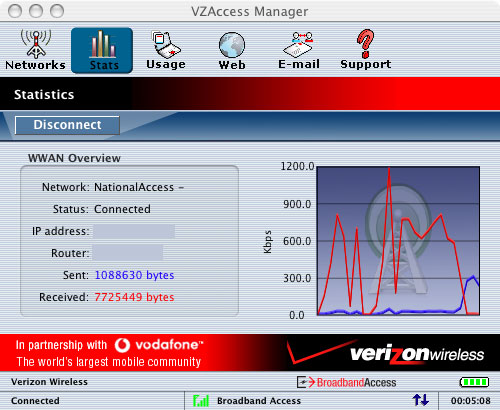
EV-DO is an abbreviation for Evolution-Data Only or Evolution-Data Optimized and through Verizon, they call it simply BroadbandAccess. It’s a service that provides wireless broadband speeds through a CMDA network and can be used on a laptop with PCMCIA wireless card and connectivity software. With Verizon it’s available in many major metropolitan areas and Sprint has recently rolled out EV-DO service as well. Cingular has a similar service called BroadbandConnect which uses HSDPA (High-Speed Downlink Packet Access) in addition to their slower, EDGE (Enhanced Data for Global Evolution) network. The maximum speed for EV-DO is around 2.4 Mbps, which I have seen on a few occasions, but the speeds can vary. In general I usually get close to DSL speed. The screenshot above shows a speed of 1.2Mbps from the Laughing Squid Headquarters in the southeast part of Potrero Hill.
What’s great is that I don’t have to worry if there is a wi-fi network available where I am or if there is one, but it is really slow and unusable. I just pop in my EV-DO card, fire up the connectivity software (Verizon’s EZAccess Manager) and I’m online in minutes with really good connectivity. I’ve been able to use it at every airport I’ve been to since I’ve had the service (SFO, Oakland, Chicago, Atlanta, Miami, etc.) and at long last I’ve canceled my T-Mobile HotSpot and Wayport accounts. According to Verizon, their EV-DO service is available in 171 metro areas and 68 airports. Recently, I’ve used it in the back seat of a car while driving along the Everglades in Florida as well as many other unusual locations that don’t have wi-fi or wired connectivity. Total broadband freedom. It reminds me of the old Ricochet days, but even better.
Of course there is a price for all of this wireless freedom. Sprint’s EV-DO service is $60.00-$80.00 month, which is pretty steep, but for me, it’s a no-brainer considering the line of work I’m in. Once the prices start to drop, many people will probably start migrating to this service. There are even EV-DO wireless routers, so in theory you could even use this at home in place of DSL or cable.
At the moment, the only Verizon EV-DO card that works on a PowerBook with OS 10.4 (Tiger) is the Kyocera KPC650, which is what I use and it works flawlessly. Of course if you run out an purchase the new MacBook Pro, then you’ll be out of luck. Apple has replaced the traditional PCMCIA card slot on the MacBook Pro with the new ExpressCard/34 slot. Currently there are not any EV-DO cards that support ExpressCard/34, but I’m sure there will be some in the near future. It is also possible that a USB solution might be available in the meantime.
Special thanks to Om Malik who originally turned me on to EV-DO and to Phil Torrone (PT of Make Magazine), who was 100% EV-DO at Webzine 2005, completely ignoring our wi-fi network, using EV-DO for everything, including his talk. PT was the one who told me about the Kyocera KPC650 card that works with Tiger on a PowerBook, which was my deciding factor in taking the plunge into EV-DO.
If you are interested in EV-DO, a really great resource is EVDOinfo.com.