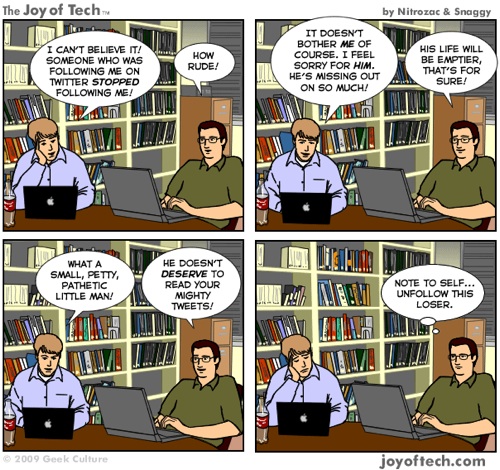
Twitter Unfollowing on The Joy of Tech

by Scott Beale on January 29, 2009 · 3 comments

Twitter Unfollow

Twitter Unfollowing on The Joy of Tech

via George Ruiz on Twitter of course

Here Are A Few Related Posts You Might Enjoy:

War of the Tweets on The Joy of Tech

Teens in Tech 2009, A Conference For Teenagers & Technology

The Joy of Tech on Blogging

SF Tech Sessions (March)

The Joy of Tech on the Microsoft Takeover Bid For Yahoo!

filed under Comics, Twitter

{ 3 comments… read them below or add one }

1 Lucretia Pruitt January 30, 2009 at 11:57 pm

Dude, I’m so unfollowing you on Twitter for this cartoon! ;)

@geekmommy

Reply

2 Andrew Littler February 3, 2009 at 1:10 pm

and this is why I am now following you

Reply

3 Eric Miraglia November 20, 2009 at 10:16 am

Regarding unfollowing on Twitter — http://bit.ly/1cZSGh — the ten things that make me unfollow people. Your version is probably better tuned into the zeitgeist, though…unfollowing because of being unfollowed. Nice, as always.

Reply

Leave a Comment

You can use these HTML tags and attributes: <a href="" title=""> <abbr title=""> <acronym title=""> <b> <blockquote cite=""> <cite> <code> <del datetime=""> <em> <i> <q cite=""> <strike> <strong>

Moderation: All comments are manually approved, so if your comment is approved it may take a while for your comment to appear on this blog post.

Irrelevant, obnoxious, trolling, abusive and spam comments will not be approved. Let's keep things civil and on topic. Basically what we are saying, if your comment does not add to the conversation, it will not be approved.

Real Name & Website: For the most part do not post anonymous comments. Please list your real name and provide a link to your website, blog, Twitter account, etc. You know who we are, so we ask the same of you.

Corrections: If you want to point out a typo or correction, please email us instead. Typo or correction comments will not be approved since they are pretty much useless once they are corrected and then only tend to confuse things.

Gravatars: If you would like a Gravatar to show up with your comment? Just sign-up for an account and any comment with your email address will display your Gravatar.

Previous post: 1981 KRON TV Report on The Future of Online News

Next post: Design Review of a First Life Avatar