Tracking Twitter Retweets Using Tweetmeme

by Scott Beale on April 20, 2009 · 6 comments

Tweetmeme

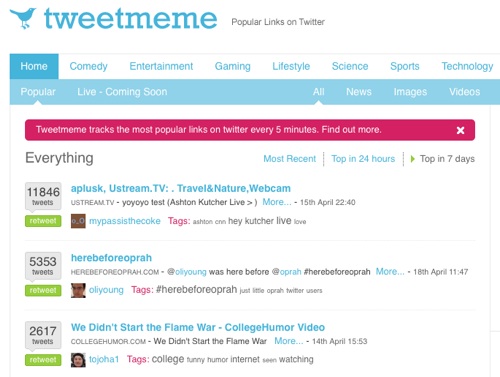
Recently I’ve added a Retweet button to our blog posts. It’s a service of Tweetmeme a website that tracks popular links on Twitter. It’s been a really good indicator for which posts are popular as well as making it easier for readers to share them on Twitter. All you do is click the button and it will compose a Twitter post with the title and link of the blog post (the link will be automatically shortened by bit.ly).

It’s super easy to add to your blog, just one line of JavaScript, no account sign-up needed.

Andrew Mager wrote about the Tweetmeme’s Retweet button last week on The Web Life and I agree with him that links shared on Twitter spread much quickly than they do on Digg, maybe Digg will implement something like this on their end.

UPDATE: Tweetmeme has removed the whitelist restriction from their Retweet button, so now you can customize it to display your Twitter @username.


Here Are A Few Related Posts You Might Enjoy:

Tweetmeme, Tracking Popular Links on Twitter

NORAD Tracking Santa Claus Around The World With Google & Twitter

Tweetwants & TweetFails, Tracking Wants & Fails on Twitter

A Tiny Thread, Tracking Threaded Twitter Conversations

Magma, Exploring & Tracking Online Video

filed under Blogs, Twitter

{ 6 comments… read them below or add one }

1 adam jackson April 20, 2009 at 3:04 pm

Perfect. I saw this on your blog this morning and immediately started searching for it. It works well.

This post was tweeted 8 times and the counter works well.
http://blog.adam-jackson.net/2009/04/15/i-stand-behind-magpie-twitter-advertisements/

Reply

2 clarke April 20, 2009 at 8:36 pm

seems useful, will watch it over the next few days, seems a bit like the early days of Digg.

though to a certain degree, I thought it was a faux pas to speak ill of Digg; but maybe Digg has gone the way of SlashDot? Still exists, but maybe not as useful as original?

Reply

3 SEOserpent April 29, 2009 at 1:00 pm

How did you get your @laughingsquid into the retweet? By default it shows up as @tweetmeme and from reading their site, it looks like you may have to be whitelisted to have that happen? Is that the case for you or do you have a trick you can share?

Reply

4 Scott Beale April 29, 2009 at 3:04 pm

You need to contact Tweetmeme directly in order to have them whitelist you.

Reply

5 Colin May 8, 2009 at 4:09 pm

Tweetmeme now has a stupid iframe bar that hijacks all your links just like the diggbar… lame.

Reply

6 Anette Ejsing June 22, 2009 at 5:44 am

Hi there,
Do you know what to do when my TweetMeme button RTs my tags, not my post titles? I can’t figure it out…

Reply

Leave a Comment

You can use these HTML tags and attributes: <a href="" title=""> <abbr title=""> <acronym title=""> <b> <blockquote cite=""> <cite> <code> <del datetime=""> <em> <i> <q cite=""> <strike> <strong>

Moderation: All comments are manually approved, so if your comment is approved it may take a while for your comment to appear on this blog post.

Irrelevant, obnoxious, trolling, abusive and spam comments will not be approved. Let's keep things civil and on topic. Basically what we are saying, if your comment does not add to the conversation, it will not be approved.

Real Name & Website: For the most part do not post anonymous comments. Please list your real name and provide a link to your website, blog, Twitter account, etc. You know who we are, so we ask the same of you.

Corrections: If you want to point out a typo or correction, please email us instead. Typo or correction comments will not be approved since they are pretty much useless once they are corrected and then only tend to confuse things.

Gravatars: If you would like a Gravatar to show up with your comment? Just sign-up for an account and any comment with your email address will display your Gravatar.

Previous post: Funny Commercials for Intimate Hair Grooming Apparatuses Roundup

Next post: Randall Munroe Working With Breadpig on Book of xkcd Comics