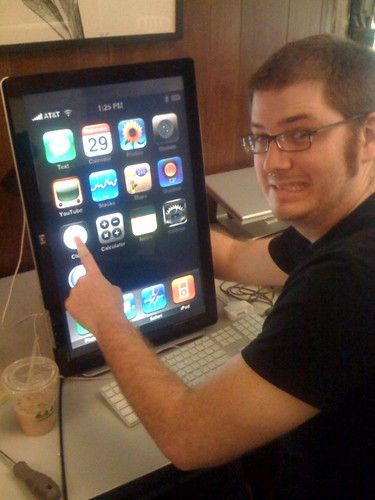
The World’s Largest iPhone

by Scott Beale on April 22, 2008 · 2 comments

Eric's huge iphone

Eric shows off The World’s Largest iPhone.

via Jason Kottke

photo by Mark Wilkie

Related Posts:

iPhone 3G, iPhone 2.0 Software Update & iPhone App Store

GOOD Magazine Graphic on the Largest Bankruptcies in History

Snow Leopard, iPhone 3G S & iPhone OS 3.0 Software Update at Apple WWDC 2009

The World’s Largest Lolcat, An Invisible Bike Mural

Airbus A380, World’s Largest Airliner To Fly Over SF

filed under Apple

{ 2 comments… read them below or add one }

1 Benji April 22, 2008 at 11:59 pm

Correction to title. The largest iPhone came when Apple first launched it back in June and used a 30″ Apple Cinema Display vertically aligned as a window display element.

Words.

Reply

2 Max March 5, 2009 at 9:27 pm

What the display’s model?

Reply

Leave a Comment

You can use these HTML tags and attributes: <a href="" title=""> <abbr title=""> <acronym title=""> <b> <blockquote cite=""> <cite> <code> <del datetime=""> <em> <i> <q cite=""> <strike> <strong>

Please read our Comment Guidelines before leaving a comment:

Moderation: Because of comment spam issues, all comments are manually approved, so if your comment is approved it may take a while for your comment to appear on this blog post.

Name & Website Required: Due to rampant abuse, we are no longer posting anonymous comments. Please list your real name and provide a link to your website. If you don't have a website, then use a link to your account on Twitter, Flickr or some other form of web presence. With very few exceptions, comments that do not refernce include an actual name or url will not be approved.

Also when we ask for your name we mean your actual name, not Discount Car Products or some other attempt at spam or lame SEO.

Be Civil: Irrelevant, obnoxious or abusive comments will not be approved. Let's keep things civil and on topic. Basically what we are saying, if your comment does not add to the conversation, it will not be approved.

Spam: Spam comments in any form will not be approved. We also do not approve comments that left for the sole purpose of posting a link.

Corrections: If you want to point out a typo or correction, please email us instead. Typo or correction comments will not be approved since they are pretty much useless once they are corrected and then only tend to confuse things.

Gravatars: If you would like a Gravatar to show up with your comment? Just sign-up for an account and any comment with your email address will display your Gravatar.

Previous post: Web 2.0 Expo San Francisco 2008 Photos

Next post: Charlie Rose Interviews Charlie Rose About Technology