SpellBound Firefox Spellchecker

by Scott Beale on December 29, 2005 · 6 comments

SpellBound

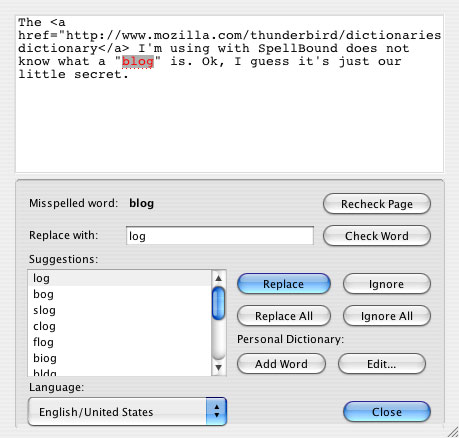
I recently started using SpellBound, a Firefox spellchecker for form input fields and textareas. It’s a great way to spell check when you are filling out forms or creating blog posts, when there is no built-in spellchecker. Trust me, when you make typos like I do, something like this comes in really handy.

The Thunderbird dictionary I’m using with SpellBound does not know what a “blog” is. Ok, I guess it’s just our little secret.

Looking to do even more cool stuff with Firefox? There are now over 600 Firefox Extensions available. Go open source, go!

Extensions are small add-ons that add new functionality to Firefox. They can add anything from a toolbar button to a completely new feature. They allow the application to be customized to fit the personal needs of each user if they need additional features, while keeping Firefox small to download.

via Jeremy Garica (Linux Magazine article)

Related Posts:

Firefox Extensions Gone Wild

Firefox 3.5 Has Been Released

Firefox 2

Firefox 3 Released & Download Day 2008

Firefox 50 Million

filed under Uncategorized

{ 3 comments… read them below or add one }

1 Adam Platti December 29, 2005 at 2:46 pm

Hey, I tried this out recently, but it does not appear to work in FF 1.5. Are you running 1.5?

Reply

2 Scott Beale December 29, 2005 at 3:17 pm

The screenshot I made for this blog post was using SpellBound with Firefox 1.5 on a Mac. You might want to double check that you are using the correct libraries for 1.5. It’s the 2nd set on the download page

Reply

3 Davetta December 29, 2005 at 6:09 pm

I’m glad I found this post! I needed a good spellchecker. Thanks! :)

Reply

Leave a Comment

You can use these HTML tags and attributes: <a href="" title=""> <abbr title=""> <acronym title=""> <b> <blockquote cite=""> <cite> <code> <del datetime=""> <em> <i> <q cite=""> <strike> <strong>

Please read our Comment Guidelines before leaving a comment:

Moderation: Because of comment spam issues, all comments are manually approved, so if your comment is approved it may take a while for your comment to appear on this blog post.

Name & Website Required: Due to rampant abuse, we are no longer posting anonymous comments. Please list your real name and provide a link to your website. If you don't have a website, then use a link to your account on Twitter, Flickr or some other form of web presence. With very few exceptions, comments that do not refernce include an actual name or url will not be approved.

Also when we ask for your name we mean your actual name, not Discount Car Products or some other attempt at spam or lame SEO.

Be Civil: Irrelevant, obnoxious or abusive comments will not be approved. Let's keep things civil and on topic. Basically what we are saying, if your comment does not add to the conversation, it will not be approved.

Spam: Spam comments in any form will not be approved. We also do not approve comments that left for the sole purpose of posting a link.

Corrections: If you want to point out a typo or correction, please email us instead. Typo or correction comments will not be approved since they are pretty much useless once they are corrected and then only tend to confuse things.

Gravatars: If you would like a Gravatar to show up with your comment? Just sign-up for an account and any comment with your email address will display your Gravatar.

Previous post: Phoneswarm

Next post: Zombie Bunny