Google Releases Mobile Gmail Application

by Scott Beale on November 2, 2006 · 2 comments

Google Mobile

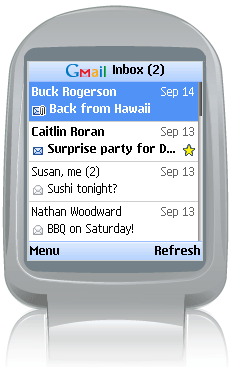
Do you use Google’s Gmail? If so, you can now access your email on your mobile device using the new Java-based Gmail Mobile application that was released today. It works amazingly well on my BlackBerry 8700. It’s fast and can even open PDF or image attachments, resizing them on the fly. These are all of the moblie devices that are currently supported and here’s a demo of how it works.

Check out Om’s write-up for more on the launch.

There are several other services offered through Google Mobile (many more planned I’m sure), including the amazing Google Maps application.


Here Are A Few Related Posts You Might Enjoy:

Google Releases Android SDK, Developing Open Mobile Platform

Google iPhone Application, Combined Access To Muliple Services

T-Mobile Announces New G1 Phone Running Google Android

Hulu Releases Desktop Application

Gmail Video, M-velope Travels Around The World

filed under Google

{ 1 comment… read it below or add one }

1 HuLsH November 17, 2006 at 8:47 am

Yea! It’s really great. I have installed it on my V800 and its working fine for now. I have used alternative app for my mail Movamail http://movamail.com/ and it works wonderful for me. I have many accounts (hotmail, gmail, yahoo…) and I am disappointed that gmail doesn’t support other mail accounts except gmail. I hope that will see in a near future Google mail client that will combine all off our mail accounts.

Reply

Leave a Comment

You can use these HTML tags and attributes: <a href="" title=""> <abbr title=""> <acronym title=""> <b> <blockquote cite=""> <cite> <code> <del datetime=""> <em> <i> <q cite=""> <strike> <strong>

Moderation: All comments are manually approved, so if your comment is approved it may take a while for your comment to appear on this blog post.

Irrelevant, obnoxious, trolling, abusive and spam comments will not be approved. Let's keep things civil and on topic. Basically what we are saying, if your comment does not add to the conversation, it will not be approved.

Real Name & Website: For the most part do not post anonymous comments. Please list your real name and provide a link to your website, blog, Twitter account, etc. You know who we are, so we ask the same of you.

Corrections: If you want to point out a typo or correction, please email us instead. Typo or correction comments will not be approved since they are pretty much useless once they are corrected and then only tend to confuse things.

Gravatars: If you would like a Gravatar to show up with your comment? Just sign-up for an account and any comment with your email address will display your Gravatar.

Previous post: SuperHappyDevHouse 13

Next post: Creative Commons Viral Video Fundraising Campaign With Revver