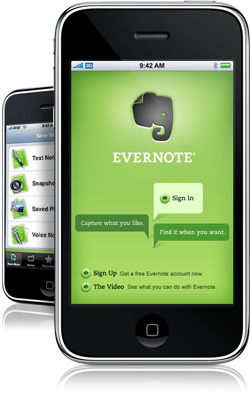
Evernote, An Easy Way Capture, Find & Sync Information

by Scott Beale on January 16, 2009 · 8 comments

Evernote

On Wednesday, Google announced that they were no longer going to develop Notebook, which really sucks since I’ve been using that quite a while to keep track of notes, projects, etc. So of course I asked Twitter for recommendations on a good Notebook replacement and by far the service recommended the most was Evernote. In fact as it turns out, Evernote is even working on a Google Notebook importer.

I checked out Evernote a little bit when it was in beta, but yesterday I took a second look and was blown away. Evernote simply rocks! I’ve set it up to synch my notes between my computers (both Mac and PC) using their excellent desktop apps, as well as online through their website and even my iPhone.

In fact I like Evernote so much that I’ve already upgraded to their premium service.

Here Are A Few Related Posts You Might Enjoy:

Foxmarks, A Super Easy Way To Sync Firefox Bookmarks

How to Capture a Giant Squid

1Password, Manage & Sync Website Passwords on a Mac & iPhone

Skitch, An Amazing Image Capture Program by Plasq

Laura Ling & Euna Lee Make First Statement Regarding Their Capture by Korea

filed under Uncategorized

{ 8 comments… read them below or add one }

1 Adam January 16, 2009 at 9:51 am

Well then gosh darnit i’m gonna use it too. I’ve been waiting for someone I trust to post their thoughts on the service. I’ll give it a shot this week while I’m in Florida.

Reply

2 Cale Bruckner January 16, 2009 at 9:57 am

Bummer re: Google Notebook but I’m not all that surprised because I heard Google is trying to re-focus on their money making properties. I’ve been playing with Evernote a bit myself, mostly because I wanted a way to capture notes on my iPhone, but I’ve been hesitant to commit because I like centralizing around Google as much as possible and I was worried about the long-term future of Evernote. Looks like I should be giving Evernote a harder look.

Reply

3 BrianBBrianriasn January 16, 2009 at 12:50 pm

I’ve been using Evernote (premium level now) for about a year and it is a wonderful program. I never thought Google notebook was very streamlined and easy to use and Evernote is far superior in almost every way.

Reply

4 Nicholas Quixote January 16, 2009 at 2:00 pm

I’ve been using evernote for 3 years, and it has really evolved and gotten better than ever. In between, I also started using Diigo which I like very much. I use the both for film projects.

Reply

5 Insomnic January 16, 2009 at 4:26 pm

I keep wanting to like Evernote but what I want most is a BlackBerry app similar to the iPhone and Windows Mobile app before I’m ready to commit.

It is definitely the “cloud notebook” of choice though.

Reply

6 Troy Malone January 17, 2009 at 9:05 am

I just talked with Evernote yesterday and they are in the middle of creating an import for Google Notebook users. This will make the transition easer!

We just integrated our Project Management system with Evernote as well. Check out how it works:

http://www.pelotonics.com/evernote_usecases.html

@troymalone

Reply

7 Cris 'atariboy' Pearson January 18, 2009 at 7:19 pm

I LOVE Evernote. I tried so many note apps for Mac(even creating my own that I used for a couple years) but have settled on Evernote since I found it about a year ago. Having access to the info anywhere (my mac, pc, iPhone or any web browser) rocks.

I use it along with Skitch (mac now, windows later) a lot too. disclaimer – I make Skitch, but I’m not the only one :) Evernote did a post about using the 2. See the video and blog post here:
http://blog.evernote.com/2008/04/10/using-skitch-with-evernote-for-mac/

I’ll often collate screenshots and add notes when designing or specing something – just dragging right into evernote.

Hope you can transition to it OK Scott!

Reply

8 Scott Beale January 18, 2009 at 7:21 pm

Yeah, I finish migrating from Google Notebook today. I’m 100% Evernote now and it’s great.

Reply

Leave a Comment

You can use these HTML tags and attributes: <a href="" title=""> <abbr title=""> <acronym title=""> <b> <blockquote cite=""> <cite> <code> <del datetime=""> <em> <i> <q cite=""> <strike> <strong>

Moderation: All comments are manually approved, so if your comment is approved it may take a while for your comment to appear on this blog post.

Irrelevant, obnoxious, trolling, abusive and spam comments will not be approved. Let's keep things civil and on topic. Basically what we are saying, if your comment does not add to the conversation, it will not be approved.

Real Name & Website: For the most part do not post anonymous comments. Please list your real name and provide a link to your website, blog, Twitter account, etc. You know who we are, so we ask the same of you.

Corrections: If you want to point out a typo or correction, please email us instead. Typo or correction comments will not be approved since they are pretty much useless once they are corrected and then only tend to confuse things.

Gravatars: If you would like a Gravatar to show up with your comment? Just sign-up for an account and any comment with your email address will display your Gravatar.

Previous post: Extended Trailer For The New CollegeHumor Show on MTV

Next post: How Laughing Squid Stickers Are Made At Sticker Giant