Dopplr, Tracking Your Fellow Travellers’ Trips

by Scott Beale on June 18, 2007 · 2 comments

Dopplr

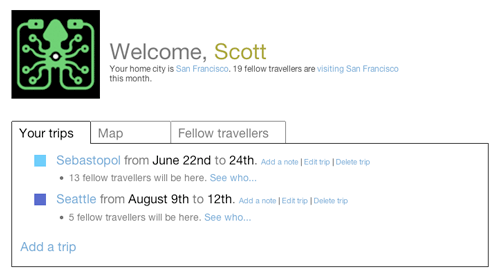
Another new social network I’ve been playing around with lately is the Helsinki based service Dopplr (named after Christian Doppler of the Doppler effect), which helps you keep track of where your friends are traveling to, as well as determining when they might be in the same city as you are. This service is especially useful if you do a lot of traveling. Web geeks I know who bounce around conferences really dig it, since it’s always good to know who else is going to be at the same out-of-town event.

Dopplr is an online service for frequent travellers. It was created by an international team of world travellers as a tool for our own use. We liked it so much that we decided to open it up to our global friends.

Social networks like Dopplr, as well as Plazes, Twitter, Jaiku, etc. are all services that can be used for what I like to call “permission based stalking”. You have full control over what time, date and location information you provide, as well as who has access to that information.

For more about Dopplr, check out their FAQ and their blog for the latest news.

Here’s my Dopplr account. Currently this service is in private, invite-only beta mode, but I have a few invites if you are interested, just send me your name and email address and I’ll hook you up (why supplies last).


Here Are A Few Related Posts You Might Enjoy:

Wikirank, Tracking What’s Popluar on Wikipedia

NORAD Tracking Santa Claus Around The World With Google & Twitter

Tweetwants & TweetFails, Tracking Wants & Fails on Twitter

Magma, Exploring & Tracking Online Video

Tracking Twitter Retweets Using Tweetmeme

filed under Uncategorized

{ 1 comment… read it below or add one }

1 Chris June 18, 2007 at 7:36 pm

I’ll take an invite…. woulda been more useful prior to my eurotrip, but should still be cool to test out. :D

Reply

Leave a Comment

You can use these HTML tags and attributes: <a href="" title=""> <abbr title=""> <acronym title=""> <b> <blockquote cite=""> <cite> <code> <del datetime=""> <em> <i> <q cite=""> <strike> <strong>

Moderation: All comments are manually approved, so if your comment is approved it may take a while for your comment to appear on this blog post.

Irrelevant, obnoxious, trolling, abusive and spam comments will not be approved. Let's keep things civil and on topic. Basically what we are saying, if your comment does not add to the conversation, it will not be approved.

Real Name & Website: For the most part do not post anonymous comments. Please list your real name and provide a link to your website, blog, Twitter account, etc. You know who we are, so we ask the same of you.

Corrections: If you want to point out a typo or correction, please email us instead. Typo or correction comments will not be approved since they are pretty much useless once they are corrected and then only tend to confuse things.

Gravatars: If you would like a Gravatar to show up with your comment? Just sign-up for an account and any comment with your email address will display your Gravatar.

Previous post: Violet Blue Photo In Oprah’s O Magazine

Next post: Drobo, A Multi-Drive Autonomous Data Storage Robot