Twitterrific

by Scott Beale on February 19, 2007 · 5 comments

Twitterrific

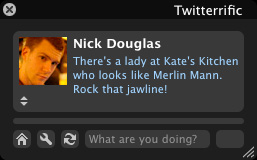
So if you are a Twitter junkie and you want to keep up with your friends updates at your computer, but don’t want to be interrupted by constant text or instant messages, then check out Twitterrific, a great little Twitter notification app from The Iconfactory.

Twitterrific is a fun little application that lets you both read and publish posts or “tweets” to the Twitter community website. The application’s user interface is clean, concise and designed to take up a minimum of real estate on your Mac’s desktop.


No related posts.

filed under Twitter

{ 1 trackback }

Snitter, A Desktop App for Twitter Powered by Adobe AIR | Laughing Squid
October 30, 2007 at 10:45 am

{ 2 comments… read them below or add one }

1 TheFemGeek February 19, 2007 at 3:16 pm

Sweet. This is something I can truly use.

Reply

2 Tod February 19, 2007 at 7:33 pm

Wow… love it. :) Seems to have a lot of timeout errors though.

Tod
http://www.todbits.com

Reply

Leave a Comment

You can use these HTML tags and attributes: <a href="" title=""> <abbr title=""> <acronym title=""> <b> <blockquote cite=""> <cite> <code> <del datetime=""> <em> <i> <q cite=""> <strike> <strong>

Please read our Comment Guidelines before leaving a comment:

Moderation: Because of comment spam issues, all comments are manually approved, so if your comment is approved it may take a while for your comment to appear on this blog post.

Name & Website Required: Due to rampant abuse, we are no longer posting anonymous comments. Please list your real name and provide a link to your website. If you don't have a website, then use a link to your account on Twitter, Flickr or some other form of web presence. With very few exceptions, comments that do not refernce include an actual name or url will not be approved.

Also when we ask for your name we mean your actual name, not Discount Car Products or some other attempt at spam or lame SEO.

Be Civil: Irrelevant, obnoxious or abusive comments will not be approved. Let's keep things civil and on topic. Basically what we are saying, if your comment does not add to the conversation, it will not be approved.

Spam: Spam comments in any form will not be approved. We also do not approve comments that left for the sole purpose of posting a link.

Corrections: If you want to point out a typo or correction, please email us instead. Typo or correction comments will not be approved since they are pretty much useless once they are corrected and then only tend to confuse things.

Gravatars: If you would like a Gravatar to show up with your comment? Just sign-up for an account and any comment with your email address will display your Gravatar.

Previous post: The 4th 2nd Annual Grilled Cheese Invitational

Next post: Burning Man Protest Protested by Burning Man Protesters