Tweet Sheet, An Ultra-Portable List of Twitter Commands

by Scott Beale on February 15, 2008 · 8 comments

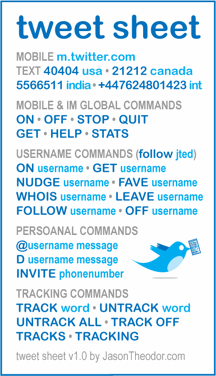
Tweet Sheet

Jason Theodor has created the super useful Tweet Sheet, an ultra-portable list of Twitter commands that you can download, print out and carry with you.


via Get Satisfaction

image via Jason Theodor

Here Are A Few Related Posts You Might Enjoy:

Spring Tweet, A Twitter Beer Brewed by 21st Amendment

Pee-wee Herman Makes His First Tweet on Twitter

The Squid List: iCal, Mobile Version & Twitter

The Portable Cell Phone Booth

XKCD Tech Support Cheat Sheet Flow Chart

filed under Hacks, Twitter

{ 4 comments… read them below or add one }

1 Adam Jackson February 15, 2008 at 1:01 pm

GEnius!!!

Reply

2 Jenn February 15, 2008 at 1:07 pm

I’m not familiar with “persoanal commands, ” but they sound super dirty.

Reply

3 Jester February 15, 2008 at 1:08 pm

Love the typo: “Persoanal Commands.” I want to see THAT list.

Reply

4 Shannon February 15, 2008 at 1:13 pm

“Persoanal?”

Reply

Leave a Comment

You can use these HTML tags and attributes: <a href="" title=""> <abbr title=""> <acronym title=""> <b> <blockquote cite=""> <cite> <code> <del datetime=""> <em> <i> <q cite=""> <strike> <strong>

Moderation: All comments are manually approved, so if your comment is approved it may take a while for your comment to appear on this blog post.

Irrelevant, obnoxious, trolling, abusive and spam comments will not be approved. Let's keep things civil and on topic. Basically what we are saying, if your comment does not add to the conversation, it will not be approved.

Real Name & Website: For the most part do not post anonymous comments. Please list your real name and provide a link to your website, blog, Twitter account, etc. You know who we are, so we ask the same of you.

Corrections: If you want to point out a typo or correction, please email us instead. Typo or correction comments will not be approved since they are pretty much useless once they are corrected and then only tend to confuse things.

Gravatars: If you would like a Gravatar to show up with your comment? Just sign-up for an account and any comment with your email address will display your Gravatar.

Previous post: MacBook Nano

Next post: FreakAngels by Warren Ellis & Paul Duffield