Flickr Improves Contact Management

by Scott Beale on December 11, 2008 · 1 comment

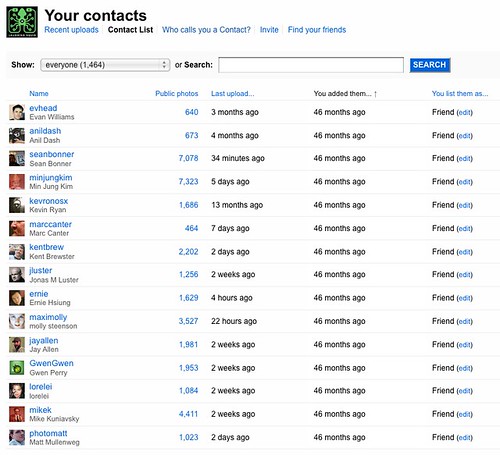
Flickr's New Contact Management

Finally! Flickr has improved how it manages contacts. I’ve wanted this feature since I first started using Flickr back in early 2005.

The changes can be found on your contact lists page.

The one-way contacts feature is especially helpful when looking for friends who made you a contact, that you might have missed. What makes it even better is that it shows their real name (if provided). The number one reason I fail to add a friends in any social network is because I don’t recognize their username.

Now time to start sorting though all of those missed contacts on my Flickr account.

Speaking of friend management, I still think Dopplr has one of the best systems out there, especially their “others you might know feature”.

UPDATE: Sean Bonner points out the sort by most public photos option.

Here Are A Few Related Posts You Might Enjoy:

Melody, A New Content Management & Blogging Platform Based on Movable Type

Flickr Celebrates Their 5th Anniversary + The Oldest Image On Flickr

Chicken John Is Looking for a Contact at PayPal

Flickr Adds New Stats Feature

Flickr Launches Collections

filed under Flickr, Photography

{ 1 comment… read it below or add one }

1 Andrew Hyde December 11, 2008 at 2:49 pm

Yes! This was the one thing that really bugged me about flickr… time to add some contacts.

Reply

Leave a Comment

You can use these HTML tags and attributes: <a href="" title=""> <abbr title=""> <acronym title=""> <b> <blockquote cite=""> <cite> <code> <del datetime=""> <em> <i> <q cite=""> <strike> <strong>

Moderation: All comments are manually approved, so if your comment is approved it may take a while for your comment to appear on this blog post.

Irrelevant, obnoxious, trolling, abusive and spam comments will not be approved. Let's keep things civil and on topic. Basically what we are saying, if your comment does not add to the conversation, it will not be approved.

Real Name & Website: For the most part do not post anonymous comments. Please list your real name and provide a link to your website, blog, Twitter account, etc. You know who we are, so we ask the same of you.

Corrections: If you want to point out a typo or correction, please email us instead. Typo or correction comments will not be approved since they are pretty much useless once they are corrected and then only tend to confuse things.

Gravatars: If you would like a Gravatar to show up with your comment? Just sign-up for an account and any comment with your email address will display your Gravatar.

Previous post: Dropbox, Secure File Syncing, Storage & Sharing

Next post: 30 Horrible Electrical Accidents, Illustrations From A 1931 Book