Flickr Geotagging

by Scott Beale on August 28, 2006 · 4 comments

Flickr Geotagging

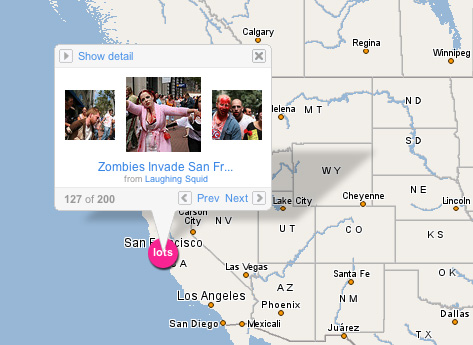
Flickr has just added support for geotagging (see Wikipedia entry on geotagging), so you can now add your photos to the exact location on a map where they were shot. You can look for locations of photos on the new Flickr map. For more on this new feature launch, check out TechCrunch.

Related Posts:

Upcoming.org Now Pulling In Flickr Photos

Flickr Celebrates Their 5th Anniversary + The Oldest Image On Flickr

Flickr Launches Collections

Flickr Adds New Stats Feature

Flickr Improves Contact Management

filed under Flickr, Photography

{ 2 comments… read them below or add one }

1 Eduardo Manchon August 29, 2006 at 5:03 pm
2 danee August 30, 2006 at 7:43 pm

wonder if this kind of interactivity will make the location scouting profession obsolete?

Reply

Leave a Comment

You can use these HTML tags and attributes: <a href="" title=""> <abbr title=""> <acronym title=""> <b> <blockquote cite=""> <cite> <code> <del datetime=""> <em> <i> <q cite=""> <strike> <strong>

Please read our Comment Guidelines before leaving a comment:

Moderation: Because of comment spam issues, all comments are manually approved, so if your comment is approved it may take a while for your comment to appear on this blog post.

Name & Website Required: Due to rampant abuse, we are no longer posting anonymous comments. Please list your real name and provide a link to your website. If you don't have a website, then use a link to your account on Twitter, Flickr or some other form of web presence. With very few exceptions, comments that do not refernce include an actual name or url will not be approved.

Also when we ask for your name we mean your actual name, not Discount Car Products or some other attempt at spam or lame SEO.

Be Civil: Irrelevant, obnoxious or abusive comments will not be approved. Let's keep things civil and on topic. Basically what we are saying, if your comment does not add to the conversation, it will not be approved.

Spam: Spam comments in any form will not be approved. We also do not approve comments that left for the sole purpose of posting a link.

Corrections: If you want to point out a typo or correction, please email us instead. Typo or correction comments will not be approved since they are pretty much useless once they are corrected and then only tend to confuse things.

Gravatars: If you would like a Gravatar to show up with your comment? Just sign-up for an account and any comment with your email address will display your Gravatar.

Previous post: Galacticast

Next post: Upcoming.org Now Pulling In Flickr Photos