Cover of The New Yorker Created Entirely on an iPhone Using the Brushes App

by Scott Beale on May 26, 2009 · 4 comments

The New Yorker iPhone

Jorge Colombo created the June 1st cover of The New Yorker entirely on an iPhone in one hour using the Brushes app.

Here’s a video made with Brushes Viewer showing how Jorge created the cover image.

Colombo’s phone drawing is very much in the tradition of a certain kind of New Yorker cover, and he doesn’t see the fact that it’s a virtual finger painting as such a big deal. “Imagine twenty years ago, writing about these people who are sending these letters on their computer.” But watching the video playback has made him aware that how he draws a picture can tell a story, and he’s hoping to build suspense as he builds up layers of color and shape.
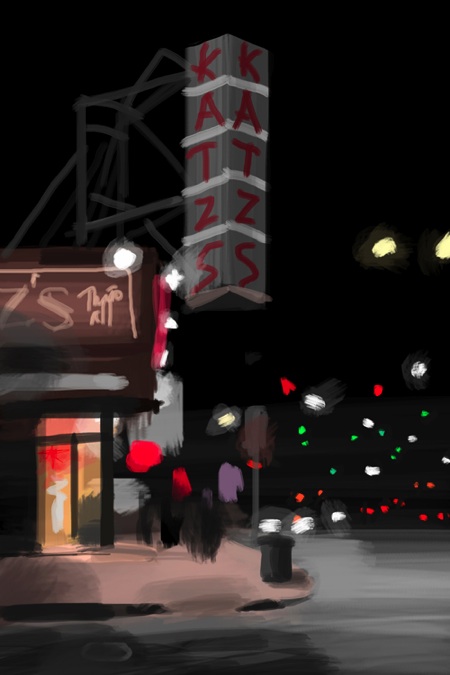
iSketch

Jorge sells prints of his iPhone art through 20×200. The prints are made in San Francisco by Electric Works and fulfilled by our friends at Noonaco.

I only got an iPhone in February 2009, so all this is still very new. It all started when I realized I could draw while night-riding in a car. Soon I found myself sketching NY spots that are part of my life. I’ve lived in the USA for 20 years and I’m still looking at its urban landscape as if I was discovering it for the first time.


via Gizmodo

Here Are A Few Related Posts You Might Enjoy:

The New Yorker Cover by Dan Clowes

The New Yorker Halloween Cover by Chris Ware

“Required Texts”, Cover of The New Yorker by Ivan Brunetti

iPhone 3G, iPhone 2.0 Software Update & iPhone App Store

The New Yorker Thanksgiving Covers by Chris Ware

filed under Art, iPhone

{ 4 comments… read them below or add one }

1 Skye May 26, 2009 at 9:00 am

Cool. There’s a free-to-use little flash app called ArtPad that my seven year old daughter uses that works like this. It has the same sequential playback of her creative process as this Brushes iPhone app. The playback of her painting makes the final product even more meaningful.

Reply

2 ryan May 26, 2009 at 11:56 am

Thats pretty amazing

Ryan

Reply

3 Aimee Greeblemonkey May 27, 2009 at 9:05 am

Rad.

Reply

4 stk May 27, 2009 at 7:44 pm

Interesting. To me, the story should be more about the person who made the App, rather than some person who uses it and sketches New York spots.

Reply

Leave a Comment

You can use these HTML tags and attributes: <a href="" title=""> <abbr title=""> <acronym title=""> <b> <blockquote cite=""> <cite> <code> <del datetime=""> <em> <i> <q cite=""> <strike> <strong>

Moderation: All comments are manually approved, so if your comment is approved it may take a while for your comment to appear on this blog post.

Irrelevant, obnoxious, trolling, abusive and spam comments will not be approved. Let's keep things civil and on topic. Basically what we are saying, if your comment does not add to the conversation, it will not be approved.

Real Name & Website: For the most part do not post anonymous comments. Please list your real name and provide a link to your website, blog, Twitter account, etc. You know who we are, so we ask the same of you.

Corrections: If you want to point out a typo or correction, please email us instead. Typo or correction comments will not be approved since they are pretty much useless once they are corrected and then only tend to confuse things.

Gravatars: If you would like a Gravatar to show up with your comment? Just sign-up for an account and any comment with your email address will display your Gravatar.

Previous post: Intel TV Ad Campaign Celebrates Nerd Rock Stars

Next post: Piss Clear Book Release Party