Technorati Favorites

by Scott Beale on February 22, 2006 · 0 comments

Technorati Favorites

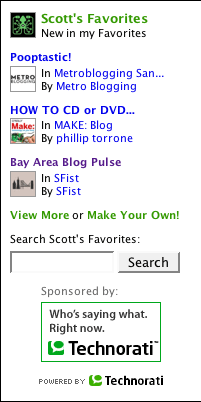
Technorati just released a cool new feature called Favorites. It’s a special page where you can add up to 50 blogs and their posts will be displayed in order of most recently updated. There is even a blog search just for Favorites. Once you have setup your Favorites, you can then add code to your blog that will show the last three updates from your Favorites page. Here’s my Favorites page. Hopefully they will increase the number of blogs that it tracks, since I follow more than 50 (all I can say is that the unread count in my feed reader is now 5 digits, I’m a bit behind).

It’s really very simple. Just tell us who your favorite bloggers are and you’ll get a custom page that lets you monitor, search, and share your Favorites!


Here Are A Few Related Posts You Might Enjoy:

Technorati One Billion Links

Laughing Squid Joins The Technorati 1000

Laughing Squid Joins The Technorati 500

The New Technorati

Google Adds Search To Google Reader

filed under Uncategorized

Leave a Comment

You can use these HTML tags and attributes: <a href="" title=""> <abbr title=""> <acronym title=""> <b> <blockquote cite=""> <cite> <code> <del datetime=""> <em> <i> <q cite=""> <strike> <strong>

Moderation: All comments are manually approved, so if your comment is approved it may take a while for your comment to appear on this blog post.

Irrelevant, obnoxious, trolling, abusive and spam comments will not be approved. Let's keep things civil and on topic. Basically what we are saying, if your comment does not add to the conversation, it will not be approved.

Real Name & Website: For the most part do not post anonymous comments. Please list your real name and provide a link to your website, blog, Twitter account, etc. You know who we are, so we ask the same of you.

Corrections: If you want to point out a typo or correction, please email us instead. Typo or correction comments will not be approved since they are pretty much useless once they are corrected and then only tend to confuse things.

Gravatars: If you would like a Gravatar to show up with your comment? Just sign-up for an account and any comment with your email address will display your Gravatar.

Previous post: Coffee Office

Next post: Mac OS X on a PC