Installing Mac OS X Leopard On A PC In Three Easy Steps

by Scott Beale on October 27, 2007 · 21 comments

dailyApps

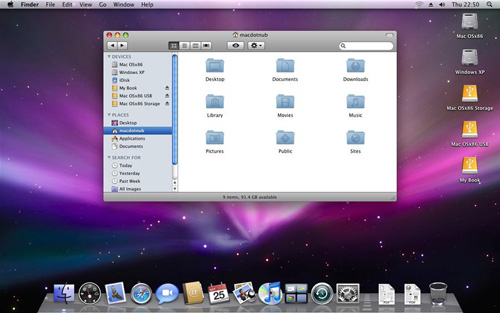
Within 24 hours of the release of Mac OS X Leopard, dailyApps has posted a tutorial on how to install Leopard on a PC (aka HackinTosh) in three easy steps using a patched DVD image based on information posted to the OSx86 Scene forums.

Well its been only a day since the Mac OSX Leopard was released officially by Apple and the hackers have managed to create a patched DVD that everyone like you and me can use to install Leopard on PC’s without having to buy a Mac. Please note the tutorial that I am going to post is still experimental and things might not work the right way simply because it is still early days in hacking Leopard to work on PC’s. Well if you don’t mind your PC getting screwed then go ahead and try out this tutorial.

UPDATE 1: Eric points out that dailyApps is currently down due to the massive traffic their Leopard hack post is generating. While you are waiting for it to come back up, why not enjoy the latest Laugh-Out-Loud Cats by Ape Lad.
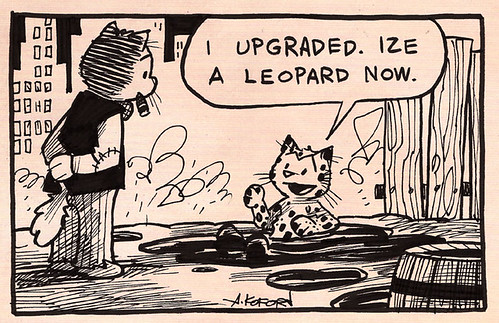

Laugh-Out-Loud Cats #437

UPDATE 2: Joe let us know that Coral Cache has cached the blog post.

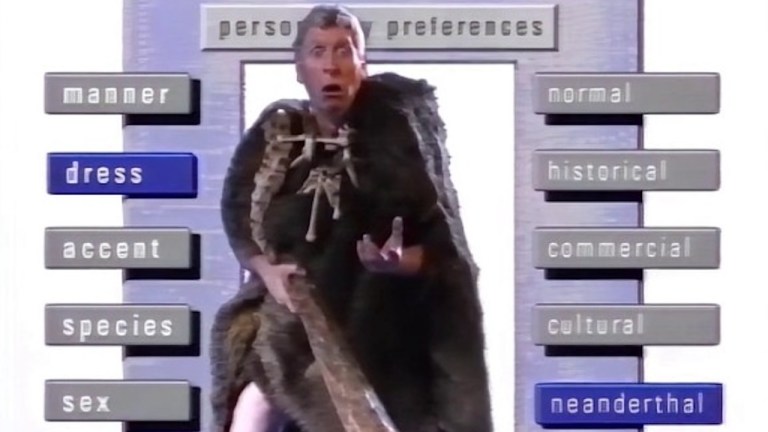
screenshot by mac.nub

Here Are A Few Related Posts You Might Enjoy:

Dell Pre-Installing Ubuntu Linux on Laptops & Desktops

Apple Mac OS X 10.6 Snow Leopard Available August 28th

Apple Mac OS X 10.5 Leopard Preview

Apple Previews Snow Leopard, Mac OS X 10.6

Mac OS X Leopard Delayed, iPhone To Blame

filed under Apple

{ 4 trackbacks }

Leopard Hacked Already : The Last Podcast
October 27, 2007 at 7:41 pm
feed me apple snacks » Installing Leopard on a PC
October 28, 2007 at 2:02 am
eayz.net
October 28, 2007 at 8:01 am
Installing Leopard on a PC | GOSSIP
October 30, 2007 at 3:03 am

{ 17 comments… read them below or add one }

1 Eric Gonzalexz October 27, 2007 at 7:12 pm

Scott, it appears they’ve exceeded their bandwidth – dead link as of 10/27

Reply

2 Jon Doe October 27, 2007 at 7:26 pm

Coral Cache to the rescue–add nyud.net to the hostname.

http://dailyapps.net.nyud.net/2007/10/hack-attack-install-leopard-on-your-pc-in-3-easy-steps/

pictures are not cached. also the article is mostly just a description–it doesn’t link to the hacked version of the leopard dvd which works on windows.

Reply

3 Tech November 3, 2009 at 10:54 am

Ok, I’ve tried hundred’s of guides out of there, some are complex, some are useless, some are incomplete, I was so damn frustrated until I found this one that was easy to install via USB Install Snow Leopard on PC

Reply

4 groovehouse October 27, 2007 at 11:05 pm
5 Russell March 12, 2008 at 6:45 pm

OMG thats awesome! Hey, after you’ve installed it, can you install OS X apps like iLife? and can you upgrade OS X easily without stuffing everything up?

Reply

6 connor December 7, 2008 at 7:46 am

neat

Reply

7 theo December 13, 2008 at 2:44 am

hi i try to install mac os 10.4.6 on my dell 1501 but i can find my hd i all run a partion of fat32 an 16 but still no mac os hd with acronis disk software that sucks i have partion my drive too many time an i have give up now i need help so plz helpp!!

my require
amd 3500+ 1.80ghz , 60gb hard drive , ati xpress 1150

Reply

8 Mac X Designer April 2, 2009 at 2:44 pm

Our new Mac OS X Leopard is very complex, even the “hackinTosh” can’t cover every thing the genuine Mac OS X Leopard can. It is most likely that if you try this hack your computer will reformat the C: drive out of some error.

But, if thats okay to you go ahead and try it.

Reply

9 @r13f June 19, 2009 at 9:43 am

Lol, just use virtual machine to try it. Just dont do the installation directly on your hd, otherwise you’ll have some trouble since it’s still experimental only.

Reply

10 taranfx June 27, 2009 at 1:14 pm

After struggling with MAC installation for several days, I finally wrote a blog to help all of u guys.
I bet this is the easiest way to Install Mac OS X Leopard OSx86 on PC Dual Boot Windows 7, Vista in 9 Easy Steps
http://www.taranfx.com/blog/?p=1204

Reply

11 jade July 22, 2009 at 9:15 am

I have a mac book pro but have deleted the leopard os and install xp. I would like the leopard to be reinstalled on it but i have had no luck so far. i have tried restarting my laptop then using the leopard boot cd to install the leopard os holding down F12 but its not booting up, the screen goes dark until xp starts up. i have even tried installing the boot cd using transmac but i am getting a error message ‘ no mac HFS volume found’. Please help me to get back leopard!!!

Reply

12 Super Rob July 26, 2009 at 4:44 pm

Jade,

Reboot/turn on your mac and hold the down ‘C’ key.
- that should have you booting from the install CD.

Go to the disk utility in the menu bar to reformat your internal hd.

You shouldn’t have any problems after that.

Good luck hun.

Reply

13 BlackHats September 10, 2009 at 7:44 am

Hi everyone,
I m trying to install Mac OS X 10.5.6 on a ASRock 775i65G board, with 1 GB Ram, 2.80 GHz CPU Intel (R), ATI Radeon 9200 256 MB and a 80 GB Maxtor HDD.

My only problem is that i can’t chose the right customize of installation.
At kernel i have tried all the boxes one by one. The installation finished successful and when the Mac OS X boot, the screen stocks at apple logo with the spiral of loading below.
And i tried again with a different option of kernels but no different, still not working, still the same problem.
All the other box option are unchecked. The only one are iPC OS X 10.5.6 base system and kernel(one of them).

What should i do ?? Please help me i m so confuse, i have tried 15 times to install but without success. I really need this one.

Thanks for any subscribe and reply. Any advice will be helpful for me.

Reply

14 dinesh kuwar September 19, 2009 at 10:47 am

i tryed to install ipc osx86 10.5.6 on my dell laptop(inspiron 1525) but the error message displayed. the message says error in “kernel_panic”
help me?plz

Reply

15 Rellik September 24, 2009 at 7:57 am

I would like to install os x on a dell inspiron laptop. Its a p4 2.0ghz with 1GB ram. It has a 512mb video card and an 80gig HD. Can I install leopard on a P4 machine?

Reply

16 Claude October 20, 2009 at 6:17 pm

I saw no mention of Sony machines & have learned that even re-installing Win XP without the original Sony restore disc is challenging. I’ve just had it with Windows & would welcome having NB work as reliably as my MACmini! Knowledgeable experience welcome!

Reply

17 Tech November 3, 2009 at 11:47 am

Ok, I’ve tried hundred’s of guides out of there, some are complex, few are useless, others are incomplete, I was so damn frustrated until I found this one that was easy to install via USB Install Snow Leopard on PC

Reply

Leave a Comment

You can use these HTML tags and attributes: <a href="" title=""> <abbr title=""> <acronym title=""> <b> <blockquote cite=""> <cite> <code> <del datetime=""> <em> <i> <q cite=""> <strike> <strong>

Moderation: All comments are manually approved, so if your comment is approved it may take a while for your comment to appear on this blog post.

Irrelevant, obnoxious, trolling, abusive and spam comments will not be approved. Let's keep things civil and on topic. Basically what we are saying, if your comment does not add to the conversation, it will not be approved.

Real Name & Website: For the most part do not post anonymous comments. Please list your real name and provide a link to your website, blog, Twitter account, etc. You know who we are, so we ask the same of you.

Corrections: If you want to point out a typo or correction, please email us instead. Typo or correction comments will not be approved since they are pretty much useless once they are corrected and then only tend to confuse things.

Gravatars: If you would like a Gravatar to show up with your comment? Just sign-up for an account and any comment with your email address will display your Gravatar.

Previous post: ZIPskinny, Demographic Information by Zip Code

Next post: Pre-Halloween Shenanigans in The Castro