TweetCraft, An In-Game Twitter Client for World of Warcraft

by Scott Beale on July 2, 2009 · 13 comments

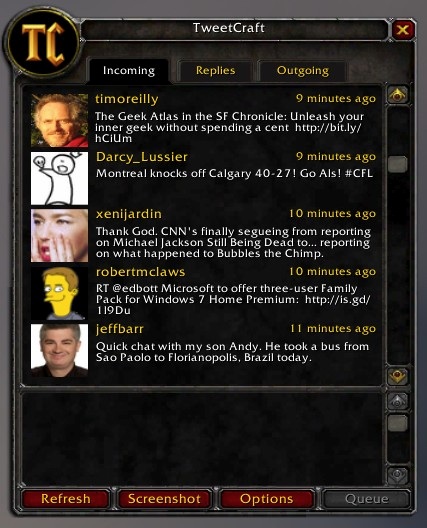
TweetCraft is an in-game Twitter client for World of Warcraft. Coding4Fun has more info on how it works.

TweetCraft

via Jeff Sandquist

Here Are A Few Related Posts You Might Enjoy:

World of Warcraft Mountain Dew Game Fuel, Available in Horde Red & Alliance Blue

World of World of Warcraft, Gamers Play a Character Playing WoW

Mr. T & William Shatner Featured in World of Warcraft Commercials

Ozzy Osbourne World of Warcraft TV Commercial

Introducing the WoW Pod: Now You Will Never Have To Stop Playing World of Warcraft

filed under Games, Twitter

{ 13 comments… read them below or add one }

1 exodus July 2, 2009 at 9:41 am

awesome! I like this mod!

Reply

2 Derek July 2, 2009 at 10:44 am

This is awesome! I’m installing it now. We’ll see how it works! :)

Thanks!

Reply

3 Jason S. July 2, 2009 at 11:43 am

Oh NOooooOOooooo. Don’t cross the streams!

Reply

4 Reece July 2, 2009 at 2:18 pm

Dreams do come true!

Reply

5 Fang Xianfu July 2, 2009 at 4:06 pm

This is 100% against the terms of use and you can be banned for using it.

“You agree that you will not modify or cause to be modified any files that are a part of a World of Warcraft installation”
“You agree that you will not create or use… any other third-party software designed to modify the World of Warcraft experience”
“You agree that you will not use any third-party software that intercepts, “mines”, or otherwise collects information from or through World of Warcraft”

TweetCraft does all these things, so your account may be at risk. User beware.

Source:
http://www.wow-europe.com/en/legal/termsofuse.html
Heading III, section 3, subsections 1-3.

Reply

6 justin July 3, 2009 at 12:51 am

actually one blizzard knows about mods they have a thing on there web site that you can download and make your own mods with…. two this doesnt collect information from wow that last one is only for leveling guides and stuff of that sort that tell you where everything is (ex. mining nodes, herbalism spots.. etc) pretty much anything that has to do with the game so no your account is not at risk if you get this mod it doesnt tell you where to go and what to do and what to pick up or tell you how to get gold or anything like that so fang im sorry but you just epicly failed N00B

Reply

7 Morpheeze July 3, 2009 at 2:50 am

#1 Is not applicable. Its an addon and being that it resides in the addon folder and does not change any file
#2 Every addon falls under that. Or not, depending on your view point. Blizzard has never done anything against that type of “changing the expierience”
#3 Again, tons of addons use Wow data. What purpose would an addon have if it wouldn’t?

Reply

8 xabbott July 3, 2009 at 3:53 am

It doesn’t do any of that.
No modification of WoW files. (It reads saved varibles).
Doesn’t modify the WoW experience.
It doesn’t collect data from within WoW. BTW data mining happens from both Curse and WoW head addons.

Reply

9 Fang Xianfu July 3, 2009 at 6:34 am

I don’t know what to say, really, except that it absolutely does do these things. You have to read the ToU in the strictest way possible, because lawyers will.

Read the linked article on Coding4Fun, which explains exactly how it works. Variously:

It’s not just an in-game addon, it uses another executable running in the system tray to get updates from and send updates to twitter.
It reads and modifies game files. To get the tweets into the game, it modifies your SavedVariables files. To get tweets out of the game, it reads those files.

The key distinction is the use of the term “third-party software”. This refers specifically to an executable that isn’t WoW.exe being run at the same time as the game. TweetCraft does this, so it falls under these rules. The difference between normal addons and this one is that those addons use no executables and interface with WoW only through the Lua API. The difference between TweetCraft and Wowhead and Curse is that Tweetdeck doesn’t just gather data from the game, it pushes data into the game.

Finally, I’m not saying that the minute you run this, you’ll be banned. I’m saying that it’s within the Terms of Use for them to do so. Whether you want to risk it or not is your choice.

Reply

10 Morpheeze July 3, 2009 at 6:58 am

Well again, this is nothing other addons do not. The name savedvariables implies that its used to store saved variables. Then, there won’t be any lawyers reading this. Blizzard just bans the addon, as it did with others in the past. CurseProfiler for example extracts game data and puts it in other places. I can’t see how spawning a process is forbidden if it serves data from the net. For example lightheaded feeds (not sure if only lua inferfaced) web data from wowhead into the quest list. However I absolutely agree to use that (any kind) of addon at your own discretion).

Reply

11 palla sridhar July 3, 2009 at 7:28 am

Hey, A game with Twitter. Hmm. nice thought. Well, actually I dont know how to play this World of Warcraft. Can it be played on desktop and what does Twitter has to do with it, i think its like a chat messenger. Anyhow another Twitter application in the making…I still only use Twhirl for my desktop access, so still new to these features. My Technology Blog has reviews on this client.

Reply

12 Oliver July 4, 2009 at 10:56 am

Hey, that’s pretty clever. Useful for gamers too. Now if only someone could make a client that runs on the steam client, so you could monitor Twitter while playing TF2. That would be awesome.

Reply

13 CannonGod July 5, 2009 at 5:59 pm

Amen to that!

Reply

Leave a Comment

You can use these HTML tags and attributes: <a href="" title=""> <abbr title=""> <acronym title=""> <b> <blockquote cite=""> <cite> <code> <del datetime=""> <em> <i> <q cite=""> <strike> <strong>

Moderation: All comments are manually approved, so if your comment is approved it may take a while for your comment to appear on this blog post.

Irrelevant, obnoxious, trolling, abusive and spam comments will not be approved. Let's keep things civil and on topic. Basically what we are saying, if your comment does not add to the conversation, it will not be approved.

Real Name & Website: For the most part do not post anonymous comments. Please list your real name and provide a link to your website, blog, Twitter account, etc. You know who we are, so we ask the same of you.

Corrections: If you want to point out a typo or correction, please email us instead. Typo or correction comments will not be approved since they are pretty much useless once they are corrected and then only tend to confuse things.

Gravatars: If you would like a Gravatar to show up with your comment? Just sign-up for an account and any comment with your email address will display your Gravatar.

Previous post: Jeff Goldblum Interrupts The Colbert Report To Let Stephen Know He’s Not Dead

Next post: Chewie Fonzarelli