WordPress Releases Stats Plugin

by Scott Beale on May 5, 2007 · 4 comments

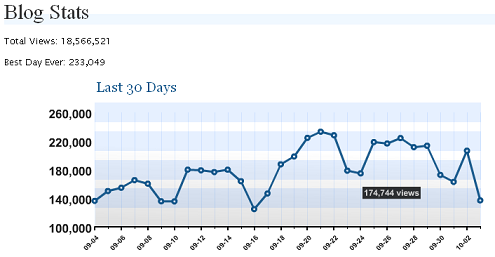
WordPress Stats

Matt Mullenweg just announced that WordPress has released a new stats plugin for bloggers who self-host their own installation of WordPress. The plugin, developed by Andy Skelton, uses the WordPress API key and is similar to the stats feature included with wordpress.com accounts.

One of the biggest advantages of this new stats plugin is that WordPress hosts the stats in their own database and generate the reports on their end, which shifts the load from your host’s server to WordPress’ servers. This is great for performance related issues, especially if your blog is being hit with a massive digg. It also makes it really easy for WordPress to upgrade and add new functionality to the stats feature.

It lets self-hosted WordPress bloggers use the exact same traffic metrics system we provide to WordPress.com users. It tracks post and page views, referrers, search terms, and clicks on your external links. It takes moments to install if you already have a WordPress blog and a WordPress.com API key. And it’s totally free.


Andy posted a detailed write-up, answering a few questions about the stats plugin.

UPDATE: Andy has posted a follow-up on the stats plugin launch with more on the reasons behind the centralized reporting.

Here Are A Few Related Posts You Might Enjoy:

The WordPress Automatic Upgrade Plugin Rocks

Flickr Photo Album WordPress Plugin

WordPress Launches New Plugin Directory

YARPP, Yet Another Related Posts Plugin For WordPress

Best Buy Cease & Desist Traffic Stats

filed under WordPress

{ 4 trackbacks }

Blog Stats Plugin für Wordpress at ogeeBloggin’
May 6, 2007 at 12:23 am
How To Install Wordpress Stats Plugin into Your Blog » SELaplana
May 7, 2007 at 1:58 am
Stats Plugin « WordPress.com
May 7, 2007 at 2:00 am
Best Buy Cease & Desist Traffic Stats | Laughing Squid
December 21, 2007 at 1:01 pm

{ 0 comments… add one now }

Leave a Comment

You can use these HTML tags and attributes: <a href="" title=""> <abbr title=""> <acronym title=""> <b> <blockquote cite=""> <cite> <code> <del datetime=""> <em> <i> <q cite=""> <strike> <strong>

Moderation: All comments are manually approved, so if your comment is approved it may take a while for your comment to appear on this blog post.

Irrelevant, obnoxious, trolling, abusive and spam comments will not be approved. Let's keep things civil and on topic. Basically what we are saying, if your comment does not add to the conversation, it will not be approved.

Real Name & Website: For the most part do not post anonymous comments. Please list your real name and provide a link to your website, blog, Twitter account, etc. You know who we are, so we ask the same of you.

Corrections: If you want to point out a typo or correction, please email us instead. Typo or correction comments will not be approved since they are pretty much useless once they are corrected and then only tend to confuse things.

Gravatars: If you would like a Gravatar to show up with your comment? Just sign-up for an account and any comment with your email address will display your Gravatar.

Previous post: Star Wars Toys That Were Never Made

Next post: Leave It to Beaver Mystery Letter (1958)