Kensington’s New Ultra-Thin Wireless Mouse Series

by Scott Beale on July 18, 2007 · 6 comments

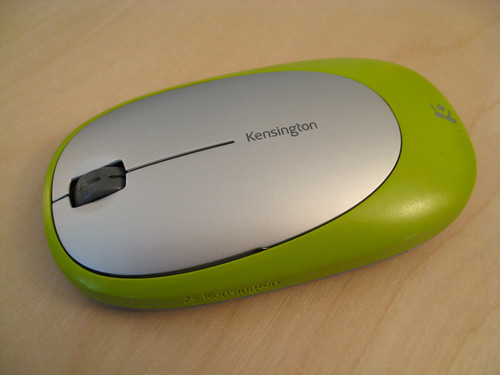
Kensington Ci70 Wireless Mouse

My wife Lori Dorn works as a Human Resources manager at Kensington, the computer accessory company based in Redwood Shores, CA which is part of ACCO Brands. She’s always bringing home cool computer products for me test out.
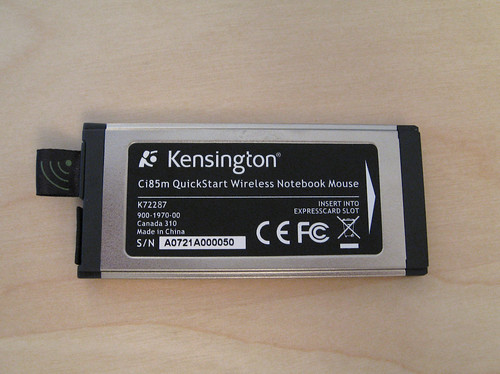
Kensington Ci85 Wireless Mouse

Kensington Ci85 Wireless Mouse

Most recently she brought me two mice from Kensington’s new, stylish and ultra-thin wireless mouse series, the Ci70 Wireless Mouse which has a USB receiver that can be stored under the mouse and the Ci85m QuickStart Wireless Notebook Mouse which uses an ExpressCard receiver that automatically connects when the the antenna is extended.
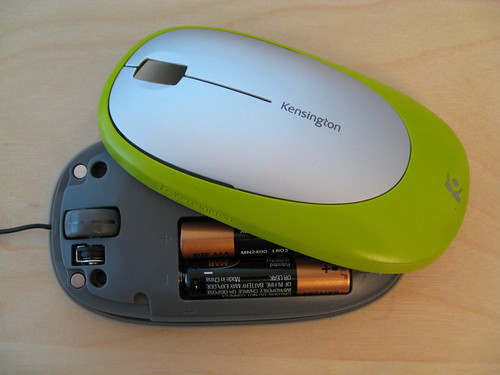
Kensington Ci85 Wireless Mouse

Both have an autosleep feature to conserve batter power and if you run out of batteries on the Ci85, just remove the cover of the mouse and unwind the USB cable, which then can be connected to the USB port on the ExpressCard, enabling the mouse can be powered by the laptop.

These are two really cool mice and I’ve switched to using the Ci70 as my full-time mouse with my Mac Pro. Here are some photos I shot of each mouse.


Here Are A Few Related Posts You Might Enjoy:

Muppets Star In a Series of Ultra Violent Wilkins Coffee TV Commercials (1957-1961)

Kensington Mini iPhone & iPod Battery Pack & Charger

Kindle, A Wireless Reading Device From Amazon That Uses EVDO

Sierra Wireless Compass 597 EV-DO USB Modem on Sprint

Eye-Fi Releases Digital Camera Wireless SD Memory Card

filed under Uncategorized

{ 3 comments… read them below or add one }

1 Kevin Tieskoetter July 18, 2007 at 4:36 pm

I don’t get it. Why would you use a mouse with proprietary wireless technology when you can just use one with Bluetooth, which is already built into a MacBook? Does this mouse bring something new to the table?

Reply

2 Harry July 18, 2007 at 6:15 pm

I think this is really cool, because when you run out of batteries you can use the cable. That’s really good

Reply

3 Mohd. Hashim Khan July 19, 2007 at 6:58 am

I was looking for a good mouse and saw this looks good but its shape is little odd and might not fit easily in palm

_____________________________________________
http://www.thenetguruz.com

Reply

Leave a Comment

You can use these HTML tags and attributes: <a href="" title=""> <abbr title=""> <acronym title=""> <b> <blockquote cite=""> <cite> <code> <del datetime=""> <em> <i> <q cite=""> <strike> <strong>

Moderation: All comments are manually approved, so if your comment is approved it may take a while for your comment to appear on this blog post.

Irrelevant, obnoxious, trolling, abusive and spam comments will not be approved. Let's keep things civil and on topic. Basically what we are saying, if your comment does not add to the conversation, it will not be approved.

Real Name & Website: For the most part do not post anonymous comments. Please list your real name and provide a link to your website, blog, Twitter account, etc. You know who we are, so we ask the same of you.

Corrections: If you want to point out a typo or correction, please email us instead. Typo or correction comments will not be approved since they are pretty much useless once they are corrected and then only tend to confuse things.

Gravatars: If you would like a Gravatar to show up with your comment? Just sign-up for an account and any comment with your email address will display your Gravatar.

Previous post: Deleted Images, A Gallery of Discarded Photos

Next post: Bikes! Betting! Booze! A Bikes To Rwanda Fundraiser