Google Earth

by Scott Beale on July 7, 2005 · 1 comment

Google Earth

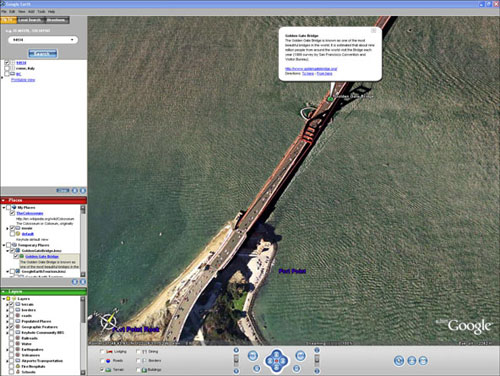
Last week Google launched Google Earth (formerly Keyhole), which is a free desktop application that combines the functionality of Google’s satellite photos along with their mapping and search features. Currently it is only available for Windows, but a Mac version is coming soon. So far it looks like a really great tool and it is going to be quite a bit of fun to play around with.

The idea is simple. It’s a globe that sits inside your PC. You point and zoom to anyplace on the planet that you want to explore. Satellite images and local facts zoom into view. Tap into Google search to show local points of interest and facts. Zoom to a specific address to check out an apartment or hotel. View driving directions and even fly along your route. We invite you to try it now.

Speaking of Google’s mapping functions, the day after the lauch of Google Earth, they released the beta version of The Google Maps API (API stands for application programming interface), which allows web developers to integrate Google maps into their website using JavaScript. We should start seeing some pretty interesting uses of this in the months to come.

Thanks for the tip Mike!

Here Are A Few Related Posts You Might Enjoy:

Explore The Moon With Google Earth

View Art Masterpieces In Madrid’s Prado Museum Using Google Earth

Dead Pixel in Google Earth

Google Earth App for iPhone and iPod Touch

Driving Directions Using Google Maps Street View

filed under Google

{ 1 comment… read it below or add one }

1 aldrien April 12, 2009 at 6:19 pm

wonderful mapping…

Reply

Leave a Comment

You can use these HTML tags and attributes: <a href="" title=""> <abbr title=""> <acronym title=""> <b> <blockquote cite=""> <cite> <code> <del datetime=""> <em> <i> <q cite=""> <strike> <strong>

Moderation: All comments are manually approved, so if your comment is approved it may take a while for your comment to appear on this blog post.

Irrelevant, obnoxious, trolling, abusive and spam comments will not be approved. Let's keep things civil and on topic. Basically what we are saying, if your comment does not add to the conversation, it will not be approved.

Real Name & Website: For the most part do not post anonymous comments. Please list your real name and provide a link to your website, blog, Twitter account, etc. You know who we are, so we ask the same of you.

Corrections: If you want to point out a typo or correction, please email us instead. Typo or correction comments will not be approved since they are pretty much useless once they are corrected and then only tend to confuse things.

Gravatars: If you would like a Gravatar to show up with your comment? Just sign-up for an account and any comment with your email address will display your Gravatar.

Previous post: Brainwash Movie Festival

Next post: dontclick.it