Flickr Adds New Stats Feature

by Scott Beale on December 13, 2007 · 4 comments

Flickr Stats

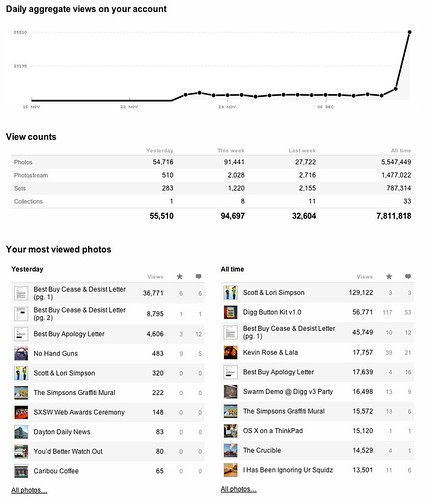
Right on! Flickr just added their long awaited Stats feature. Statistics are now available for all of their Pro users. For more on the new Stats, see their FAQ.

Here’s a snapshot of what Laughing Squid’s stats look like on Flickr. That little spike there on the end is due to the whole Best Buy Cease & Desist issue.

UPDATE: Flickr also released their new Uploadr 3.0 today.

Here Are A Few Related Posts You Might Enjoy:

Best Buy Cease & Desist Traffic Stats

WordPress Releases Stats Plugin

Flickr Launches New Galleries Feature

Flickr Launches New Video Feature

Flickr Adds Picnik, An Integrated Online Photo Editor

filed under Uncategorized

{ 2 trackbacks }

Flickr adds Stats Tracking Pro Accounts - WOOT!
December 13, 2007 at 12:34 pm
Flickr Stats » Jeremy Johnstone Blog
December 15, 2007 at 10:18 pm

{ 1 comment… read it below or add one }

1 Steve Rhodes December 13, 2007 at 3:37 pm

The stats are great, something I’ve wanted for a while.

One tip is to click on flickr.com under domains to see some really detailed info on how people are finding photos through sets and groups as well as contacts.

Another thing that is pretty clear is people aren’t finding collections. I don’t have as much traffiic as you, but there is a similar huge gap between views of sets and collections.

It might help if there was some visual representation that a set was in a collection and a similar thing for individual photos.

Reply

Leave a Comment

You can use these HTML tags and attributes: <a href="" title=""> <abbr title=""> <acronym title=""> <b> <blockquote cite=""> <cite> <code> <del datetime=""> <em> <i> <q cite=""> <strike> <strong>

Moderation: All comments are manually approved, so if your comment is approved it may take a while for your comment to appear on this blog post.

Irrelevant, obnoxious, trolling, abusive and spam comments will not be approved. Let's keep things civil and on topic. Basically what we are saying, if your comment does not add to the conversation, it will not be approved.

Real Name & Website: For the most part do not post anonymous comments. Please list your real name and provide a link to your website, blog, Twitter account, etc. You know who we are, so we ask the same of you.

Corrections: If you want to point out a typo or correction, please email us instead. Typo or correction comments will not be approved since they are pretty much useless once they are corrected and then only tend to confuse things.

Gravatars: If you would like a Gravatar to show up with your comment? Just sign-up for an account and any comment with your email address will display your Gravatar.

Previous post: Visible Vinyl by Jason Freeny

Next post: Animation of Dane Cook Talking About The Kool-Aid Man