Firefox 3 Robot Themed Easter Egg

by Scott Beale on June 19, 2008 · 22 comments

Firefox 3 Robot Themed Easter Egg

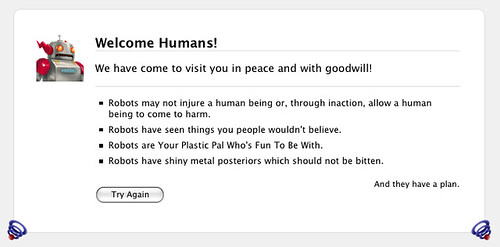
Firefox 3, which was released on Tuesday, has a really cool Easter Egg. Just type “about:robots” in the address bar (aka the “awesome bar”) and nice tribute to the Firefox 3 robot mascot appears.

UPDATE 1: Another Easter Egg, “The Book of Mozilla”, can be found by typing “about:mozilla”.

UPDATE 2: George Kelly make a great sound about “about:robots”.

via Lifehacker

Here Are A Few Related Posts You Might Enjoy:

Firefox 2

Firefox 3 Released & Download Day 2008

Firefox 3.5 Has Been Released

Foxmarks, A Super Easy Way To Sync Firefox Bookmarks

Firefox, Happy 20,000,000!

filed under Robots

{ 11 comments… read them below or add one }

1 Idaho June 19, 2008 at 2:41 pm

“And They have a plan”

That last line totally got me :)

Reply

2 Greg June 19, 2008 at 6:45 pm

If you type in about:mozilla you get another fun little thing.

Reply

3 Doctor Popular June 19, 2008 at 7:32 pm

AllAboutGeorge also has an awesome song about this called “About:Robots”.

It’s been stuck in my head all day.

Reply

4 asurroca June 19, 2008 at 8:54 pm

Yeah, that last bit definitely made it kick ass, but I love all the references. I’d say it gives the user a pretty well-rounded idea of what robots are, what they can and cannot do, what they’ve seen, what you should not do to them, etc.

Reply

5 george June 19, 2008 at 10:52 pm

robots is a plan Mozilla have for firefox.
it’s the name of a set of modules-like plugins for how they want to “grow” the browser beyond it’s current platform and abilities…..stay tuned

Reply

6 Nicholas June 20, 2008 at 2:41 am

If nobody has clicked on the Try Again button, I strongly urge you to do so. Twice ;)

Reply

7 Kurth June 20, 2008 at 5:45 am

Anyone else notice the last bullet? A reference to Bender?

“Bite My Shiny Metal Ass!” – Bender

Reply

8 Ryan Barnes June 20, 2008 at 7:00 am

about:ninjas? DAMN!

Reply

9 Kori June 20, 2008 at 8:10 am

Check the source, some funny Ghostbusters humour in there:

http://www.mozilla.org/keymaster/gatekeeper/there.is.only.xul

Reply

10 Scott Beale June 20, 2008 at 8:12 am

Thanks Greg & Doc, I’ll update the post with both of those.

Reply

11 Giancarlo June 20, 2008 at 2:42 pm

Interesting try this about:mozilla

Reply

Leave a Comment

You can use these HTML tags and attributes: <a href="" title=""> <abbr title=""> <acronym title=""> <b> <blockquote cite=""> <cite> <code> <del datetime=""> <em> <i> <q cite=""> <strike> <strong>

Moderation: All comments are manually approved, so if your comment is approved it may take a while for your comment to appear on this blog post.

Irrelevant, obnoxious, trolling, abusive and spam comments will not be approved. Let's keep things civil and on topic. Basically what we are saying, if your comment does not add to the conversation, it will not be approved.

Real Name & Website: For the most part do not post anonymous comments. Please list your real name and provide a link to your website, blog, Twitter account, etc. You know who we are, so we ask the same of you.

Corrections: If you want to point out a typo or correction, please email us instead. Typo or correction comments will not be approved since they are pretty much useless once they are corrected and then only tend to confuse things.

Gravatars: If you would like a Gravatar to show up with your comment? Just sign-up for an account and any comment with your email address will display your Gravatar.

Previous post: Requiem For A Day Off

Next post: Spore 404 Error Page