Twitter Launches Mobile Interface

by Scott Beale on May 4, 2007 · 16 comments

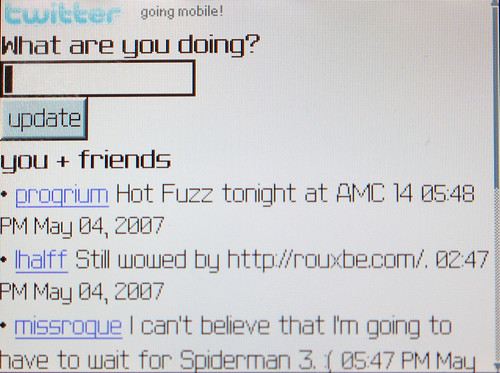
Twitter Mobile

Ok, now we are talking, at long last Twitter has launched has a special streamlined mobile interface: http://m.twitter.com

For those of you using SMS/text messaging, you can now switch over to web based access (assuming your phone has a browser) and start saving some scratch.

Oh hey, while I’m at it, here’s Laughing Squid’s Twitter profile.

UPDATE: Evan Williams made an informal announcement via Twitter about the mobile interface launch.

via » Robert Boyle on Twitter

photo credit: Scott Beale

Here Are A Few Related Posts You Might Enjoy:

The Squid List: iCal, Mobile Version & Twitter

Get Satisfaction Launches Overheard, Customer Service via Twitter

Google Releases Mobile Gmail Application

Lowbrow Art Pioneer Robert Williams Launches Website

I Hardly Know Her, A Super Simplified Interface For Flickr

filed under Twitter

{ 11 trackbacks }

Paul’s Weblog » Blog Archive » Twitter Option
May 5, 2007 at 9:49 am
Twitter Launches a Mobile Phone Friendly Web Site « Oatmeal Stout - Justin Thorp’s Web 2.0 blog
May 5, 2007 at 12:16 pm
Twitter Mobile Interface
May 5, 2007 at 2:00 pm
proxieslist.net
May 5, 2007 at 2:06 pm
Twitter Goes Mobile
May 6, 2007 at 12:48 pm
document.write("Markus Tressl");
May 6, 2007 at 12:53 pm
links for 2007-05-07
May 6, 2007 at 6:23 pm
Unatine :: blog : links for 2007-05-07
May 6, 2007 at 6:25 pm
links for 2007-05-07 « My Weblog
May 7, 2007 at 4:16 am
links for 2007-05-08 | tutesuite | adventures in social media
May 8, 2007 at 1:26 am
Virtual Business News » 3 Tips to Get Twitter on Your Cellphone for Free
May 8, 2007 at 9:39 am

{ 5 comments… read them below or add one }

1 Deepak May 5, 2007 at 6:36 pm

They need to move the main site over to that look n feel. It’s much nicer

Reply

2 Mark Evans May 6, 2007 at 4:54 am

Great, yet another way for the Twitter-Nation to be even more connected. Frankly, I don’t get this Twitter phenomena: it seems far too 1984-ish, and downright strange people feel the need to broadcast where they are and whaat they’re doing.

Reply

3 AsceticMonk April 16, 2008 at 3:04 pm

I’ve added a webclip on my iPod touch’s home screen. Thanks!

Reply

4 Paul Caldwell January 24, 2009 at 6:49 pm

I’ve loaded twitter mobile but where do i register???.

Reply

5 yuanita August 27, 2009 at 9:49 am

How do I download twitter launcher on my blackberry javelin??

Reply

Leave a Comment

You can use these HTML tags and attributes: <a href="" title=""> <abbr title=""> <acronym title=""> <b> <blockquote cite=""> <cite> <code> <del datetime=""> <em> <i> <q cite=""> <strike> <strong>

Moderation: All comments are manually approved, so if your comment is approved it may take a while for your comment to appear on this blog post.

Irrelevant, obnoxious, trolling, abusive and spam comments will not be approved. Let's keep things civil and on topic. Basically what we are saying, if your comment does not add to the conversation, it will not be approved.

Real Name & Website: For the most part do not post anonymous comments. Please list your real name and provide a link to your website, blog, Twitter account, etc. You know who we are, so we ask the same of you.

Corrections: If you want to point out a typo or correction, please email us instead. Typo or correction comments will not be approved since they are pretty much useless once they are corrected and then only tend to confuse things.

Gravatars: If you would like a Gravatar to show up with your comment? Just sign-up for an account and any comment with your email address will display your Gravatar.

Previous post: Spencer Tunick Plans Giant Nude Photo Shoot in Mexico City

Next post: Millimeters Matter, Tossing Tiny Pies at Insects