Todoist, A Simple Online To-Do List & Task Manager

by Scott Beale on September 13, 2007 · 6 comments

Todoist

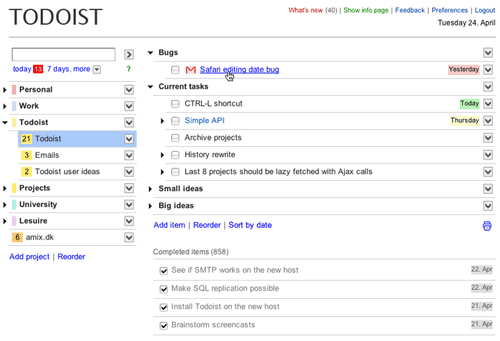
I’ve been searching for a good online task manager for a while. I checked the various 37signals services, including Ta-Da List, which are all great services. I used the excellent Remember The Milk for a while. I even tried using Google Notebook for to-do lists and a task manager. I finally settled on Todoist, which was created by Danish developer Amir Salihefendic earlier this year.

Todoist is fast, simple and elegant. It has most of the features I’ve been looking for and they are always adding new stuff. I’m now hooked and use it constantly to stay organized, including the mobile version of Todoist, which works great on my iPhone. In fact I like Todoist so much I’ve even upgraded to their premium version.

Some favorite Todoist features are its super streamlined and easy to navigate interface which has just the right amount of AJAX functionality, keyboard shortcuts, date insertion & queries and reminders via IM and Twitter. Plus they have an open API allowing for the development of things like the Todoist widgets.


Here Are A Few Related Posts You Might Enjoy:

The Squid List: iCal, Mobile Version & Twitter

A Simple Plan

The Squid List Gets A Re-Design As It Nears 10 Years

Simple Spark: 5000 Web Apps in 333 Seconds

2600 Online, Play 50+ Classic Atari 2600 Games Online

filed under Uncategorized

{ 6 comments… read them below or add one }

1 Colin September 13, 2007 at 2:32 pm

I was using todoist a while back when I was trying out several productivity apps but drifted away from using it in favor of a Did Done list just run off my personbal wiki. Looks like they added some nice features — I might try it again. Though frankly I’m kinda waiting till someone puts together a good non-web-based iPhone to do list app that syncs.

Reply

2 willo September 13, 2007 at 2:40 pm

awesome! I have used a number of to-do list apps & sites as well. For a long time, To Do X & then more recently (so that I could have it on my iPhone) I switched to Tadalist… but I have missed the sub-list like To Do X had, and I love that this also has reminders & such! I’m stoked. Thanks Scott!

Reply

3 qDot September 13, 2007 at 4:17 pm

I’ve been using TadaLists for a long time, but if this does sublisting right, I may end up switching. I’ve really been looking for something I can use to organize multistage projects. Thanks Scott!

Reply

4 Jarin Udom September 13, 2007 at 5:01 pm

Awesome, Nozbe’s interface was killing me!!

Reply

5 dhayes September 15, 2007 at 11:41 am

Thanks for sharing your research.. just signed up.

Reply

6 AbuAbdAllah March 10, 2008 at 10:12 pm

I started a Google Group for Todoist.com users. The group fills the gap left by the understandable decision of the developers to give support only to paid users. But it also permits easy sharing of power-user tips, feature requests, bug reports, kudos, and more. Check it out and please spread the word: http://groups.google.com/group/todoists

Reply

Leave a Comment

You can use these HTML tags and attributes: <a href="" title=""> <abbr title=""> <acronym title=""> <b> <blockquote cite=""> <cite> <code> <del datetime=""> <em> <i> <q cite=""> <strike> <strong>

Moderation: All comments are manually approved, so if your comment is approved it may take a while for your comment to appear on this blog post.

Irrelevant, obnoxious, trolling, abusive and spam comments will not be approved. Let's keep things civil and on topic. Basically what we are saying, if your comment does not add to the conversation, it will not be approved.

Real Name & Website: For the most part do not post anonymous comments. Please list your real name and provide a link to your website, blog, Twitter account, etc. You know who we are, so we ask the same of you.

Corrections: If you want to point out a typo or correction, please email us instead. Typo or correction comments will not be approved since they are pretty much useless once they are corrected and then only tend to confuse things.

Gravatars: If you would like a Gravatar to show up with your comment? Just sign-up for an account and any comment with your email address will display your Gravatar.

Previous post: Chicken John Is Looking for a Contact at PayPal

Next post: War Of The Worlds eComic by Ian Edginton & D’Israeli