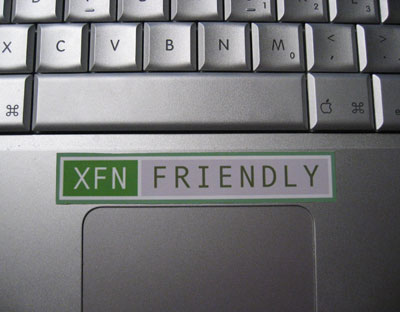
XFN Friendly

by Scott Beale on March 16, 2005 · 0 comments

XFN Friendly

On Monday and Tuesday, I attended many great panels at SXSW, but two stand out in particular. Both moderated by Tantek Celik (Technorati), Monday’s panel was “How to Trick-Out Your Blog” featuring Jay Allen (Six Apart), Matt Mullenweg (WordPress) and Dunstan Orchard (Apple). Tuesday’s panel was “How to Leverage Decentralized Social Networks” (check out Eddie’s notes on this one) and featured Jonas Luster (CollabNet), Joyce Park (CommerceNet), danah boyd and Ernie Hsiung (Yahoo).

One topic that surfaced in both of these panels was XFN, which is a system for defining and connecting social networks between personal websites. Here’s an explanation from the XFN website:

XFN (XHTML Friends Network) is a simple way to represent human relationships using hyperlinks. In recent years, blogs and blogrolls have become the fastest growing area of the Web. XFN enables web authors to indicate their relationship(s) to the people in their blogrolls simply by adding a 'rel' attribute to their <a href> tags.

This system, developed by Tantek Celik, Matt Mullenweg and Eric Meyer, is pre-built into WordPress’ link manager and is used by many other applications and websites. rubhub is a search engine that shows the personal relationships between websites that use XFN, i.e. websites that are “XFN Friendly”. For example, here are the rubhub search results for Laughing Squid. Give it a try with your blog.


Related Posts:

Cat Found, Not Very Friendly

Matt Mullenweg Announces WordPress Inc.

Automattic Launches

WordPress 5th Birthday Party This Tuesday in San Francisco

filed under Apple, Events, WordPress

Leave a Comment

You can use these HTML tags and attributes: <a href="" title=""> <abbr title=""> <acronym title=""> <b> <blockquote cite=""> <cite> <code> <del datetime=""> <em> <i> <q cite=""> <strike> <strong>

Please read our Comment Guidelines before leaving a comment:

Moderation: Because of comment spam issues, all comments are manually approved, so if your comment is approved it may take a while for your comment to appear on this blog post.

Name & Website Required: Due to rampant abuse, we are no longer posting anonymous comments. Please list your real name and provide a link to your website. If you don't have a website, then use a link to your account on Twitter, Flickr or some other form of web presence. With very few exceptions, comments that do not refernce include an actual name or url will not be approved.

Also when we ask for your name we mean your actual name, not Discount Car Products or some other attempt at spam or lame SEO.

Be Civil: Irrelevant, obnoxious or abusive comments will not be approved. Let's keep things civil and on topic. Basically what we are saying, if your comment does not add to the conversation, it will not be approved.

Spam: Spam comments in any form will not be approved. We also do not approve comments that left for the sole purpose of posting a link.

Corrections: If you want to point out a typo or correction, please email us instead. Typo or correction comments will not be approved since they are pretty much useless once they are corrected and then only tend to confuse things.

Gravatars: If you would like a Gravatar to show up with your comment? Just sign-up for an account and any comment with your email address will display your Gravatar.

Previous post: Boing Boing

Next post: SXSW 2005 Wrap-Up