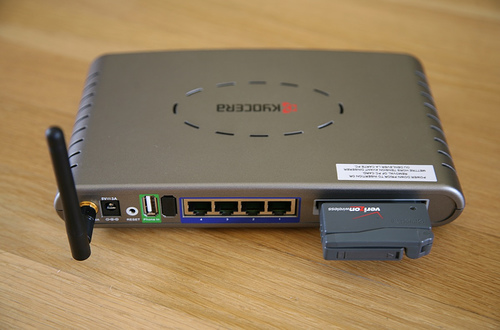
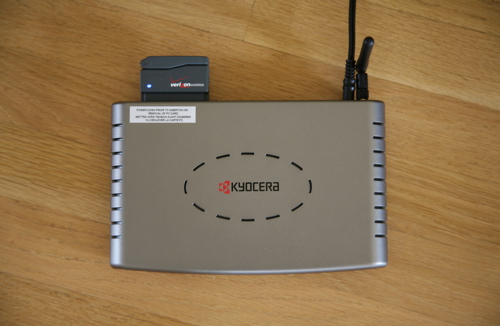
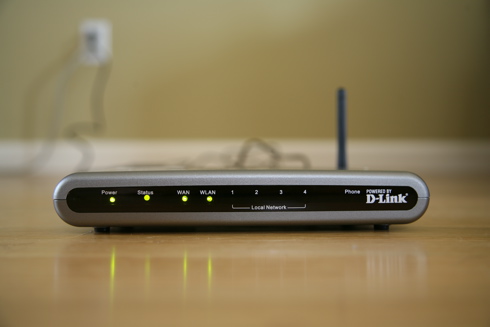
Back in January I had written about how much I love EV-DO. Well things just got even better. I recently purchased the Kyocera KR1 Mobile Router, which is a 4 port D-Link router that has a slot for EV-DO cards and a USB port for EV-DO phones so you can setup and even share an EV-DO broadband connection through a wireless network or ethernet connection. I ordered it through the fine folks at EVDOinfo.com, who provide excellent up-to-date EV-DO news and info. The unit is fairly compact (the size of a normal 4 port router) and even comes with a vehicle power adapter. This really opens up the possibilities for how this can be used. In fact, imagine its potential with a portable power supply.

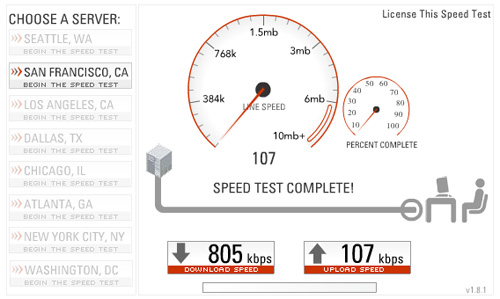
The setup was a breeze (standard router configuration wizard) and it worked with my existing Kyocera KPC650 card that uses Verizon’s BroadbandAccess EV-DO network. I had the router configured as an access point with a working wireless network in about 5 minutes. I was also able to setup WPA encryption, with no problems connecting to the network using both Mac and Windows. I did some speed tests from Laughing Squid’s San Francisco headquarters and I’ve been getting around 500-900 Kbps down and 100-120 Kbps up (the max for EV-DO is 2.4 Mbps, which is in fact possible in some areas).

Now my portable broadband network is ready to go. I just show up with it, plug it in and in a minute or so the wireless network is live. That’s all there is to it. All I need is power and Verizon EV-DO coverage. Have an old laptop without a wi-fi card? No problem, just plug it into one of the 4 ethernet ports.

I’m going to bring the EV-DO router up to Gnomedex this week and see if I can get it to work at the conference and maybe do some testing with distance and number of users.

photo credit: Scott Beale

filed under Uncategorized


This website uses IntenseDebate comments, but they are not currently loaded because either your browser doesn't support JavaScript, or they didn't load fast enough.

{ 22 comments… read them below or add one }

Jasmeet June 27, 2006 at 2:55 pm

YOu know, that would be perfect at unconferences like events at House of Shields, etc. Hell, you could leave it in your car if it’s parked out front.

Ted Rheingold June 27, 2006 at 5:48 pm

cool-i-o!

Peter Orosz June 28, 2006 at 3:34 am

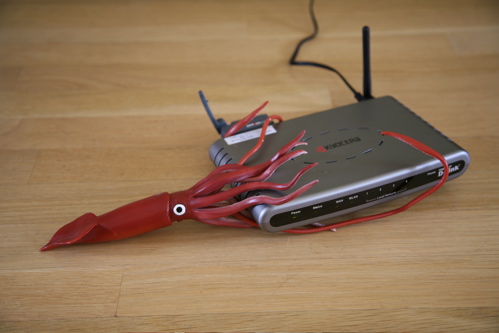
Where did you get that rubber squid?

nakedgremlin June 28, 2006 at 7:22 am

Noticed the slot for the USB — probably for VOIP. But Verizon has a nasty “no VOIP, no P2P, no upload/download of music, movies, etc.”.

Have you encountered any restrictions on VOIP (ie. through Skype)? or actual metering of your download/upload on P2Ps?

That’s one thing that no one ever tests in all the reviews I’ve read.

Scott Beale June 28, 2006 at 7:11 am

The squid came from the Monterey Bay Aquarium gift shop.

Scott Beale June 28, 2006 at 8:03 am

The USB slot is for connections from EV-DO phones. I have not yet tested it with VOIP, Skype or P2P.

Eddie Codel June 28, 2006 at 11:45 am

Very rad. Now we know who to call for our wifi conference needs! :)

Cory June 30, 2006 at 8:10 pm

Hi Scott,
We have been using this device since January with Verizon EV-DO on a Mac, PC and phone since last summer.

We attempted to get DSL installed into my fathers store in NYC. We called Verizon and other suppliers and learned it could take months to get an appointment with no guarantees (NYC Gramercy Park Area is a bit backed up for DSL installations).

My husband found this magic box you describe here, and all broadband troubles were over! This allows us to access everything quickly and easily from the back of the shop wirelessly!

We would still be waiting for Verizon or one of these other internet providers to come and hook us up…

Also, we suggest a directional antenna that helps with the reception – that helped get the signal from the front window to our back office.

Big Love from NYC,
See you in the desert hopefully )*(
Cory

Joe July 1, 2006 at 1:40 pm

Verizon EV-DO sucks. Sprint is WAY better. I have both. Sprint’s coverage is better, and it’s way faster than Verizon. Their technical support is better, too. Gow tith Sprint! You won’t be sorry!

Jon Gales July 2, 2006 at 11:21 pm

If you want to save a few bucks on hardware, you can share your EV-DO internet connection through a laptop (have it create the WiFi network for other devices to connect to). I’ve done it several times with my PowerBook when more than one computer needed online and EV-DO was the only connection available.

Garrick Leach July 11, 2006 at 11:30 am

This Kyocera KR1 is really hot right now. There are virtually endless possibilites if you know how to use it right. Since we have carried it in our store I found a whole new meaning to life. We have gotten a few people that have had trouble connecting to a verizon network using the Kyocera KR1 and the Kyocera PC650 has any one else run into this issue?

Maureen August 2, 2006 at 8:57 pm

I did not have much luck with KR1 using VPN for my work. I return it and exchanged for 3G Phoebus which works great. I am really impressed with the design (not for travel as I am using it at my home office). I plut in the EVDO card and push the power button, within 30 seconds, I am connected to internet ! Launch my Nortel VPN client, I am on my company intranet. Great product for working people with security concerns. It’s also a conversation piece for all my friends and relatives. When they first saw it, everyone would ask: “Wow ! what is this cool thing ?”

Here is where I bought it for $195:
http://www.onsale.com/onsale/shop/detail~dpno~7040786.asp

metroman December 11, 2006 at 7:37 pm

I have been using a desktop as a host with a pcmcia to pci adapter using the Verizon PC5740 card with VZaccess. This worked great until I had a host crash. A friend told me about the KR1 & I recently purchased one. The first one out of the box would self reset about every 2-3 minutes. The current one I have works better but with inactivity of an hour or so I loose the STATUS and WAN light. The only way I can get it back is to pull the power from the unit for 15 seconds. My throughput seems to be about 1/3 the speed compares to the host. Some of these problems may be Verizon related. With VZaccess you could get a signal strength in dbm. The signal I would get would pop from -57 to -120 dbm back and forth. I live on the fringe in Western NY. When I purchased the Card I was told the speed would increase from the 180-250kbs I was getting to 1mb with a few months. It’s been almost a year but their working on it I am told. Looking for any comments. Thanks.

Alex February 8, 2007 at 11:27 am

The Linksys/Sprint WRT54G3G-ST is a great router! it has VPN support and doubles as a cable/dsl router as well! — for more info read this thorough review by the EVDO Experts at :

Tbird April 19, 2007 at 5:39 am

I am having tremendous problem with using the Verizon PC-5750 EVDO card. KR1 router will not connect. Looked at the WAN configuration page, it has userID and password. The PC-5750 worked fine in my laptop with the VZAccess software. Does any one has any luck with the PC-5750 EVDO card? Any sugestion?

EVDO guy April 24, 2007 at 1:24 pm

With the current firmware (RK1008), the KR1 is not compatible with the PC5750. Lots more info on this at http://www.evdoforums.com

EVDOinfo May 5, 2007 at 6:23 am

Kyocera will soon be announcing firmware RK1010 that provides full support for the U720/USB720 as well as the PX500/PC5750.

As with prior firmware releases, EVDOinfo.com and 3GStore.com are first to sell KR1 routers with this new firmware! …for more info, read:

http://www.evdoinfo.com/content/view/1973/64/

Cooper May 23, 2007 at 7:57 am

Verizon EvDO card, KR1, and Linksys VOIP don’t work. I spent 4 frustrating hours trying to configure this with no luck. I have my Linksys VoIP box connected to the KR1. I have a desktop and a line phone connected to the Linksys VoIP box. The Linksys VoIP connects fine to the KR1 and the desktop connects fine to the internet. The problem is the Linksys VoIP box won’t registered the line phone I have connected. Every time it tries to connect, it fails. I connected Verizon for help. It was a waste of time contacting them. Here’s how I got around it. I ditched the Verizon Express card for Sprint EvDO and my Linksys box was able to register my phone.

John Kavanagh July 26, 2007 at 1:40 pm

I just spoke with Kyocera KR1 technical support. Kyocera no longer support the PC5750 card with the KR1. What gives!

Noel Monzon September 28, 2007 at 11:12 am

Hey guys
KR1 is the bomb, after I upgraded the firmware it worked right of the bat. I use it while staying in my RV and my buddy who parks next to me in his rig picks up the wireless too. But it’s all secure wep. Awesome system. I use it with skype which is $90 a year. unlimited and can be used with video.

EVDOinfo March 14, 2008 at 7:45 pm

The new Kyocera KR2 is now shipping. The KR2 replaces the venerable KR1 and improves upon it by using a WiFi N radio and adding an expresscard slot.

Much more info in our full Kyocera KR2 Router Review at http://www.EVDOinfo.com/KR2

RfWeL June 2, 2008 at 10:54 pm

Yeah the Kyocera KR2 replaced the “vulnerable” KR1, but lets give the KR2 the justice it deserves. This is an all you can eat router. It supports all three data card form factors ( USB, PCMCIA Cards and ExpressCards). It supports EvDO and HSDPA ( with a firmware update). Not to mention that you can even use it as your home wireless router. Using the Ethernet Uplink you can utilize a DSL or Cable modem. Now I call that a ROUTER. Even the best router can still have compatibility issues with different models of cards. To see if your data card is supported check out http://rfwel.com/forums/forumdisplay.php?f=48 for the most comprehensive compatibility list online.

Previous post:

Next post: