Keyboardr – Your New Meta-Search Engine

by Burstein! on May 13, 2009 · 0 comments

guest post by Burstein!

Keyboardr

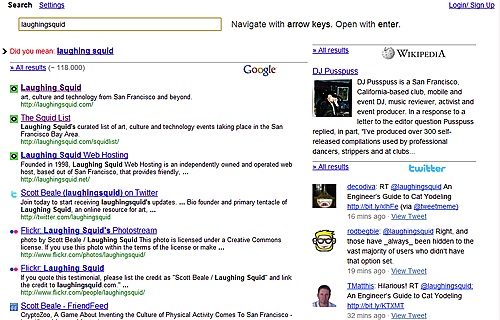
Keyboardr is a masterstroke of design by Julius Eckert. It starts with the simple interface of a digital clock. With each keystroke in the field-entry box, Keyboardr will automatically search in the engines of your choice (google, google images, youtube, twitter, wikipedia, etc.). This is way more impressive than other meta-search engines for a few reasons. First, it is faster and the UI is much more accessible. Second, you can use it with your keyboard, which makes your searching much faster. This even extends to finding the settings page, which can be done by merely hitting the space bar while the field-entry box is blank.

A new nightly development version of Keyboardr is now open to the public.

Very well done.

Hat tip to Mediapathic

Here Are A Few Related Posts You Might Enjoy:

Wikia Search, A Community Driven Search Engine

PleaseDressMe, A T-Shirt Search Engine

Google Blog Search

Google Search Time Capsule From 2001

WolframAlpha, A Computational Knowledge Engine Providing Output From Structured Data

filed under Design, Internet

Leave a Comment

You can use these HTML tags and attributes: <a href="" title=""> <abbr title=""> <acronym title=""> <b> <blockquote cite=""> <cite> <code> <del datetime=""> <em> <i> <q cite=""> <strike> <strong>

Moderation: All comments are manually approved, so if your comment is approved it may take a while for your comment to appear on this blog post.

Irrelevant, obnoxious, trolling, abusive and spam comments will not be approved. Let's keep things civil and on topic. Basically what we are saying, if your comment does not add to the conversation, it will not be approved.

Real Name & Website: For the most part do not post anonymous comments. Please list your real name and provide a link to your website, blog, Twitter account, etc. You know who we are, so we ask the same of you.

Corrections: If you want to point out a typo or correction, please email us instead. Typo or correction comments will not be approved since they are pretty much useless once they are corrected and then only tend to confuse things.

Gravatars: If you would like a Gravatar to show up with your comment? Just sign-up for an account and any comment with your email address will display your Gravatar.

Previous post: Introducing the WoW Pod: Now You Will Never Have To Stop Playing World of Warcraft

Next post: Reach, The Story of a Robot With a Very Short Power Cable