Google Spreadsheets

by Scott Beale on September 25, 2006 · 0 comments

Google Spreadsheets

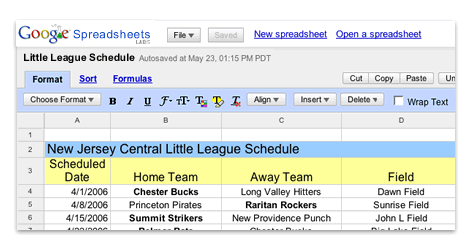
So I finally had a chance to check out Google Spreadsheets. Totally amazing. Works pefectly. I was able to import my existing spreadsheets without any problems. It has an autosave and auto refresh feature, plus you can setup sharing with others and give them view or edit access. It even has integrated Google Talk, so you can discuss things in realtime on the same page as the spreadsheet. I don’t have many spreadsheets, so this is a perfect solution for me. I no longer have to synch spreadsheets between multiple machines and I have access to them wherever I go. So long Excel. I’m one step closer to finally being done with Microsoft Office.

Next up, test out Writely, Google’s recently acquired online word processing service.

UPDATE: Safari is not currently supported.

Here Are A Few Related Posts You Might Enjoy:

Google Announces New Open Source Operating System Google OS

Doodle 4 Google, Inviting Students to Design the Google Logo

Google Adds Search To Google Reader

Google Launches Similar Images & Google News Timeline

Google Docs in Plain English

filed under Google

Leave a Comment

You can use these HTML tags and attributes: <a href="" title=""> <abbr title=""> <acronym title=""> <b> <blockquote cite=""> <cite> <code> <del datetime=""> <em> <i> <q cite=""> <strike> <strong>

Moderation: All comments are manually approved, so if your comment is approved it may take a while for your comment to appear on this blog post.

Irrelevant, obnoxious, trolling, abusive and spam comments will not be approved. Let's keep things civil and on topic. Basically what we are saying, if your comment does not add to the conversation, it will not be approved.

Real Name & Website: For the most part do not post anonymous comments. Please list your real name and provide a link to your website, blog, Twitter account, etc. You know who we are, so we ask the same of you.

Corrections: If you want to point out a typo or correction, please email us instead. Typo or correction comments will not be approved since they are pretty much useless once they are corrected and then only tend to confuse things.

Gravatars: If you would like a Gravatar to show up with your comment? Just sign-up for an account and any comment with your email address will display your Gravatar.

Previous post: Bruce Sterling Lecture at CCA

Next post: ScobleShow