FriendFeed Comments on Laughing Squid

by Scott Beale on June 24, 2008 · 1 comment

FriendFeed Comments

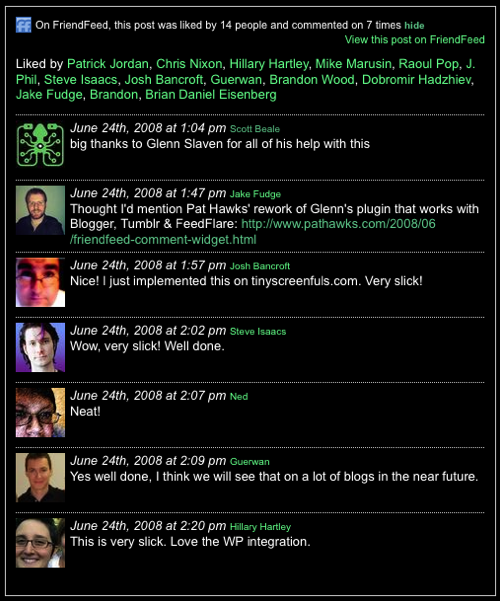
Yesterday I installed the excellent FriendFeed Comments WordPress Plugin on this blog, which adds an expandable section just above the comments showing all the Likes and Comments from FriendFeed that are associated with a blog post.

Big thanks to Sydney developer Glenn Slaven, author of the plugin, who personally helped me through some CSS bugs that were causing problems with the plugin and our template. I love how collaborative software and web development have evolved in recent years. Glenn saw a comment from me on FriendFeed that I was having problems with the plugin and offered to help. Within a couple of hours, he resolved the issue and even wored the changes in to the next release of the plugin.

If you want to see how the FriendFeed Comments plugin works, just leave a comment about this post on FriendFeed and it will eventally show up below in the FriendFeed Comments section (I’m not sure if it’s the API, but it takes a little while before the comments show up).


Related Posts:

Laughing Squid Comments Now Using Disqus

FriendFeed, Aggregate and Share Web Content With Friends

Backtype, Helping You Track & Search Comments

FriendFeed Beta Redesign Featuring Updates in Real-Time

Laughing Squid Link Blog Redux

filed under Blogs

{ 1 comment… read it below or add one }

1 pixelbud July 6, 2008 at 1:28 pm

I think this is a perfect circle for FriendFeed users and a great way for bloggers to see their comments from that arena.

FriendFeed comments + Disqus FTW

Reply

Leave a Comment

You can use these HTML tags and attributes: <a href="" title=""> <abbr title=""> <acronym title=""> <b> <blockquote cite=""> <cite> <code> <del datetime=""> <em> <i> <q cite=""> <strike> <strong>

Please read our Comment Guidelines before leaving a comment:

Moderation: Because of comment spam issues, all comments are manually approved, so if your comment is approved it may take a while for your comment to appear on this blog post.

Name & Website Required: Due to rampant abuse, we are no longer posting anonymous comments. Please list your real name and provide a link to your website. If you don't have a website, then use a link to your account on Twitter, Flickr or some other form of web presence. With very few exceptions, comments that do not refernce include an actual name or url will not be approved.

Also when we ask for your name we mean your actual name, not Discount Car Products or some other attempt at spam or lame SEO.

Be Civil: Irrelevant, obnoxious or abusive comments will not be approved. Let's keep things civil and on topic. Basically what we are saying, if your comment does not add to the conversation, it will not be approved.

Spam: Spam comments in any form will not be approved. We also do not approve comments that left for the sole purpose of posting a link.

Corrections: If you want to point out a typo or correction, please email us instead. Typo or correction comments will not be approved since they are pretty much useless once they are corrected and then only tend to confuse things.

Gravatars: If you would like a Gravatar to show up with your comment? Just sign-up for an account and any comment with your email address will display your Gravatar.

Previous post: George Carlin Showing Children How To Be a Class Clown

Next post: The Website is Down: Sales Guy vs Web Dude